FAQ
OKA interface
Question
Why is OKA always displaying the same data?
Answer
There are 2 possible explanations:
Caches are used to cache OKA API responses to speed up the display of data in the interface. You might need to manually clear the caches in case OKA does not refresh the data even though you know they have been updated (see Clear cache).
UI Filters are used to filter what is displayed by OKA (to show only a sub-group of jobs for example, see Filters). You might need to modify your filters to change the data displayed.
Consumers
Question
Why is there ‘No results found’ when looking at a category/sub-category details page ?
Answer
One reason for this could be the presence of one or more ‘/’ characters within your category and/or sub-category names (i.e. for those provided using data enhancers) and/or values. We support all special characters except the ‘/’ here and using it might lead to unexpected behaviors.
Question
Why are all UIDs equal to -1 ?
Answer
UIDs should be retrieved through the ingested logs. However, if this is not the case, there will be an attempt to find the UID related to the user associated with a job using the following command
uid = getpwnam(u).pw_uid. If after this, the UID is still not found, the default-1value will be assigned. Therefore, if all your UIDs are set to-1it might be due to one of two reasons:
Missing information on your logs.
Impossibility to find UID for a user through configuration (i.e getpwnam).
To forcefully generate replacement UIDs, use the checkbox
Generate id if naninConf job scheduler.

Resources
Question
Why do most of my jobs show as Out of Memory in the Consumed vs. requested memory chart after updating to OKA v3.3.0?
Answer
The Consumed_vs_Requested_Memory field changed format in OKA v3.3.0:
Up to
OKA v3.2.1, it was stored as a percentage (MaxRSS × 100 / Requested_Memory, e.g.85for 85%).Since
OKA v3.3.0, it is stored as a plain ratio (Consumed_Memory / Requested_Memory, e.g.0.85for 85%).
The Resources sunburst chart introduced in OKA v3.3.0 expects the new format.
Jobs ingested before the update therefore appear 100 times larger than they are, and almost all of them land in the Out of Memory category.
The Consumed memory chart also shows nothing for those jobs, because the Consumed_Memory field did not exist before OKA v3.3.0.
Jobs ingested after the update are not affected.
To convert previously ingested jobs, apply the following Data Enhancer to each affected cluster:
Create a new Data Enhancer from Management → Data Enhancers with the code below, then publish it (see Data enhancers).
convert_legacy_memory_ratio.py
"""Data Enhancer: Convert memory ratios ingested before OKA 3.3.0.

Description: Up to OKA 3.2.1, ``Consumed_vs_Requested_Memory`` was stored as a
percentage (``MaxRSS * 100 / Requested_Memory``). Since OKA 3.3.0 it is stored as a
plain quotient (0.85 means 85%). This enhancer divides the legacy values by 100 so
they match the new format, and can optionally fill ``Consumed_Memory`` from
``MaxRSS`` for the same jobs.

A row is converted only when it has no ``Consumed_Memory`` (OKA 3.2.1 never wrote it)
and its ratio still equals ``MaxRSS * 100 / Requested_Memory``. Rows ingested by
OKA 3.3.0, or already converted, fail that check and are left untouched, so the
enhancer can safely be applied more than once.
"""

import numpy as np
import pandas as pd
from applications.data_manager.lib.enhancer import DataEnhancer
from pydantic import BaseModel, Field

RATIO_COL = "Consumed_vs_Requested_Memory"
CONSUMED_MEM_COL = "Consumed_Memory"
MAXRSS_COL = "MaxRSS"
REQMEM_COL = "Requested_Memory"
PERCENT_PER_UNIT = 100
# Legacy and converted values differ by a factor of 100, so a loose tolerance still
# tells them apart while absorbing any rounding in the stored percentage.
RELATIVE_TOLERANCE = 0.05


class ConvertLegacyMemoryRatioParams(BaseModel):
    """Parameters for :class:`ConvertLegacyMemoryRatio`.

    Attributes:
        backfill_consumed_memory: Also copy ``MaxRSS`` into ``Consumed_Memory`` for the
            converted jobs, so they appear in the ``Consumed memory`` chart. This is the
            figure the legacy ratio was computed from, which may differ from the one
            OKA 3.3.0 records for newly ingested jobs.
    """

    backfill_consumed_memory: bool = Field(
        default=False,
        description="Copy MaxRSS into Consumed_Memory for converted jobs",
    )


class ConvertLegacyMemoryRatio(DataEnhancer[ConvertLegacyMemoryRatioParams]):
    """Convert percentage memory ratios stored by OKA 3.2.1 and earlier to quotients."""

    params_model = ConvertLegacyMemoryRatioParams

    def run(self, data: pd.DataFrame, **kwargs) -> pd.DataFrame:
        """Divide legacy ``Consumed_vs_Requested_Memory`` values by 100.

        Args:
            data: Input DataFrame. Returned unchanged if a required column is absent.
            **kwargs: Ignored; present for base-class compatibility.

        Returns:
            The same DataFrame with legacy ratios converted.
        """
        missing = [c for c in (RATIO_COL, MAXRSS_COL, REQMEM_COL) if c not in data]
        if missing:
            self.logger.warning("Columns %s not found, nothing to convert.", missing)
            return data

        ratio = pd.to_numeric(data[RATIO_COL], errors="coerce")
        maxrss = pd.to_numeric(data[MAXRSS_COL], errors="coerce")
        reqmem = pd.to_numeric(data[REQMEM_COL], errors="coerce").replace(0, np.nan)
        if CONSUMED_MEM_COL in data.columns:
            consumed = pd.to_numeric(data[CONSUMED_MEM_COL], errors="coerce")
        else:
            consumed = pd.Series(np.nan, index=data.index)

        candidates = ratio.notna() & consumed.isna()
        legacy_percent = maxrss * PERCENT_PER_UNIT / reqmem
        legacy = candidates & np.isclose(
            ratio, legacy_percent, rtol=RELATIVE_TOLERANCE, atol=0
        )

        data.loc[legacy, RATIO_COL] = ratio[legacy] / PERCENT_PER_UNIT
        self.logger.info("Converted %d legacy memory ratios.", int(legacy.sum()))

        # Zero ratios need no conversion; anything else left over is worth a look.
        unmatched = int((candidates & ~legacy & (ratio != 0)).sum())
        if unmatched:
            self.logger.warning(
                "%d jobs have a ratio but no '%s' and do not match the legacy "
                "formula; they were left unchanged (already converted?).",
                unmatched,
                CONSUMED_MEM_COL,
            )

        if self.params.backfill_consumed_memory:
            if CONSUMED_MEM_COL not in data.columns:
                data[CONSUMED_MEM_COL] = np.nan
            data.loc[legacy, CONSUMED_MEM_COL] = maxrss[legacy]
            self.logger.info("Filled '%s' from '%s'.", CONSUMED_MEM_COL, MAXRSS_COL)

        return data
Optionally, test it in the sandbox on a sample of the cluster data: in the
Sample changessection, legacy values such as85should become0.85.From the Apply page, select the cluster and the
accountingdata source, select the enhancer, and run it (see Applying enhancers to existing data). Leave the filters empty to process all jobs, or restrict the date range to jobs ingested before the update.Once the run is completed, clear the caches (see Clear cache) to refresh the charts.
The enhancer only converts jobs that have no Consumed_Memory field and whose ratio still equals MaxRSS × 100 / Requested_Memory.
Jobs ingested with OKA v3.3.0 or already converted are left unchanged, so running it more than once is safe.
The backfill_consumed_memory parameter (disabled by default) also copies MaxRSS into Consumed_Memory for the converted jobs, so they appear in the Consumed memory chart.
To enable it, click the settings icon (⚙) next to the enhancer on the Apply page.
Note
This conversion only fixes the unit of the stored value: the ratio of converted jobs is still computed from MaxRSS, as it was before the update.
OKA v3.3.0 started reworking how memory usage is parsed and reported, and depending on the job scheduler the consumed memory recorded for newly ingested jobs may be measured differently.
Converted and newly ingested jobs may therefore not be strictly comparable.
This is a known limitation that will be addressed in upcoming releases.
GPU hours
Note
If you arrived here from the release notes looking to enhance the data post update from OKA v2.7.0 or OKA v2.8.0, know that the following script will handle both GPU hours and Multicluster enhancement.
Question
What steps should I take to make my existing data compatible with new GPU and GPU_hours support?
Answer
Logs ingested with a version prior to the OKA v2.7.0 and OKA v2.8.0 will not contain the computed part regarding the GPU hours.
To update existing data, we provide a simple script that you can configure and execute in order to recompute the missing info within the Elasticsearch database.
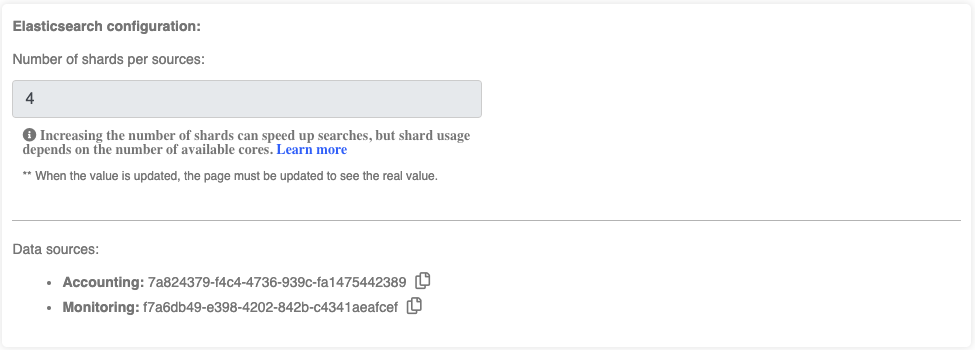
Identify required information from Management/Clusters page and OKA’s conf file:
Elasticsearch host and port: Required to access the database.
Cluster names: Required to be used as value for the new field to be created.
Index names for “Accounting” and “Monitoring”: Required to specify the indexes to update.
Save the following script as
update_cluster_uid_and_gpuhours.shupdate_cluster_uid_and_gpuhours.sh
#!/bin/bash

# Script to update Cluster_UID field for multiple Elasticsearch indexes
# and calculate GPU_hours for OKA Core index in each cluster

# ========================
# EDIT THIS SECTION
# ========================
# Default settings
ES_HOST="localhost"
ES_PORT="9200"

# Format: "cluster_name": ["index for Accounting", "index for Monitoring"]
read -r -d '' CONFIG << 'EOF'
{
    "cluster 1": ["Enter Accounting index", "Enter Monitoring index"],
    "cluster 2": ["Enter Accounting index", "Enter Monitoring index"],
    "cluster 3": ["Enter Accounting index", "Enter Monitoring index"]
}
EOF
# ========================
# END EDIT SECTION
# ========================

# Function to update Cluster_UID for regular indexes
add_cluster_uid_col() {
    local index=$1
    local cluster_uid=$2

    echo "Setting mapping for Cluster_UID in index '${index}'"
    curl -X PUT "http://${ES_HOST}:${ES_PORT}/${index}/_mapping" \
        -H "Content-Type: application/json" \
        -d '{
            "properties": {
                "Cluster_UID": {
                    "type": "text",
                    "fields": {
                        "keyword": {
                            "type": "keyword",
                            "ignore_above": 256
                        }
                    }
                }
            }
        }'

    echo "Updating index '${index}' with Cluster_UID '${cluster_uid}'"
    curl -X POST "http://${ES_HOST}:${ES_PORT}/${index}/_update_by_query?refresh=false&slices=auto&requests_per_second=-1" \
        -H "Content-Type: application/json" \
        -d "{
            \"script\": {
                \"source\": \"ctx._source[\\\"Cluster_UID\\\"] = \\\"${cluster_uid}\\\"\",
                \"lang\": \"painless\"
            },
            \"query\": {
                \"match_all\": {}
            }
        }"

    echo ""
}

# Function to update both Cluster_UID and GPU_hours for first index (combined operation)
add_cluster_uid_and_gpu_hours() {
    local index=$1
    local cluster_uid=$2

    echo "Setting mappings for Cluster_UID and GPU_hours in index '${index}'"
    curl -X PUT "http://${ES_HOST}:${ES_PORT}/${index}/_mapping" \
        -H "Content-Type: application/json" \
        -d '{
            "properties": {
                "Cluster_UID": {
                    "type": "text",
                    "fields": {
                        "keyword": {
                            "type": "keyword",
                            "ignore_above": 256
                        }
                    }
                },
                "GPU_hours": {
                    "type": "float"
                }
            }
        }'

    echo "Updating index '${index}' with Cluster_UID '${cluster_uid}' AND calculating GPU_hours"
    curl -X POST "http://${ES_HOST}:${ES_PORT}/${index}/_update_by_query?refresh=false&slices=auto&requests_per_second=-1" \
        -H "Content-Type: application/json" \
        -d "{
            \"script\": {
                \"source\": \"ctx._source['Cluster_UID'] = '${cluster_uid}'; if (ctx._source.containsKey('Allocated_GPU') && ctx._source.containsKey('Execution_Time') && ctx._source['Allocated_GPU'] != null && ctx._source['Execution_Time'] != null) { double gpu_hours = ctx._source['Allocated_GPU'] * (ctx._source['Execution_Time'] / 3600.0); ctx._source['GPU_hours'] = gpu_hours; } else { ctx._source['GPU_hours'] = 0.0; }\",
                \"lang\": \"painless\"
            },
            \"query\": {
                \"match_all\": {}
            }
        }"

    echo ""
}

# Process each cluster and its indexes
echo "Starting cluster UID updates and GPU hours calculations..."
echo "${CONFIG}" | jq -c 'to_entries[]' | while read -r entry; do
    cluster_uid=$(echo "${entry}" | jq -r '.key')
    read -ra indexes <<< "$(echo "${entry}" | jq -r '.value | @sh')"
    echo "Processing cluster: ${cluster_uid}"

    # Process first index with combined operation (Cluster_UID + GPU_hours) for OKA Core
    first_index=${indexes[0]}
    echo "Processing first index with combined operation: ${first_index}"
    add_cluster_uid_and_gpu_hours "${first_index}" "${cluster_uid}"

    # Process second index (if exists) with only Cluster_UID update for OKA Core Stats
    if [[ ${#indexes[@]} -eq 2 ]]; then
        second_index=${indexes[1]}
        echo "Processing second index with Cluster_UID only: ${second_index}"
        add_cluster_uid_col "${second_index}" "${cluster_uid}"
    fi

    echo "Completed processing for cluster: ${cluster_uid}"
    echo "----------------------------------------"
done

echo "All cluster UID updates and GPU hours calculations completed!"
Make the script executable:
chmod +x update_cluster_uid_and_gpuhours.sh
Edit the CONFIG section in the script to match your clusters and indexes
read -r -d '' CONFIG << 'EOF'
{
   "cluster name 1": ["index-uuid-1", "index-uuid-2"],
   "cluster name 2": ["index-uuid-3", "index-uuid-4"]
}
EOF
Run the script:
./update_cluster_uid_and_gpuhours.sh
Important
Depending on the size of your indexes, this process can take a significant amount of time. For reference, processing approximately 10 million documents typically takes 20-25 minutes.
Multi-Cluster
Note
If you arrived here from the release notes looking to enhance the data post update from OKA v2.7.0 or OKA v2.8.0, know that the following script will handle both GPU hours and Multicluster enhancement.
Question
What steps should I take to make my existing data compatible with multicluster support?
Answer
In order to fully take advantage of the multicluster functionality, documents stored in Elasticsearch indexes must contain a Cluster_UID field.
This will be used to identify the cluster the document is associated with and is essential for OKA to properly categorize and display log information within its different modules.
This field was added for JobScheduler logs as part of OKA v2.7.0 and OKA v2.8.0 for Occupancy specific data.
Logs ingested prior to those versions won’t have the required format to work properly in multicluster mode.
To add the missing Cluster_UID field to your existing documents, follow these steps:
Identify required information from Management/Clusters page and OKA’s conf file:
Elasticsearch host and port: Required to access the database.
Cluster names: Required to be used as value for the new field to be created.
Index names for “Accounting” and “Monitoring”: Required to specify the indexes to update. They are visible in Management/Clusters under the “Data sources” section:
Save the following script as
update_cluster_uid_and_gpuhours.shupdate_cluster_uid_and_gpuhours.sh
#!/bin/bash

# Script to update Cluster_UID field for multiple Elasticsearch indexes
# and calculate GPU_hours for OKA Core index in each cluster

# ========================
# EDIT THIS SECTION
# ========================
# Default settings
ES_HOST="localhost"
ES_PORT="9200"

# Format: "cluster_name": ["index for Accounting", "index for Monitoring"]
read -r -d '' CONFIG << 'EOF'
{
    "cluster 1": ["Enter Accounting index", "Enter Monitoring index"],
    "cluster 2": ["Enter Accounting index", "Enter Monitoring index"],
    "cluster 3": ["Enter Accounting index", "Enter Monitoring index"]
}
EOF
# ========================
# END EDIT SECTION
# ========================

# Function to update Cluster_UID for regular indexes
add_cluster_uid_col() {
    local index=$1
    local cluster_uid=$2

    echo "Setting mapping for Cluster_UID in index '${index}'"
    curl -X PUT "http://${ES_HOST}:${ES_PORT}/${index}/_mapping" \
        -H "Content-Type: application/json" \
        -d '{
            "properties": {
                "Cluster_UID": {
                    "type": "text",
                    "fields": {
                        "keyword": {
                            "type": "keyword",
                            "ignore_above": 256
                        }
                    }
                }
            }
        }'

    echo "Updating index '${index}' with Cluster_UID '${cluster_uid}'"
    curl -X POST "http://${ES_HOST}:${ES_PORT}/${index}/_update_by_query?refresh=false&slices=auto&requests_per_second=-1" \
        -H "Content-Type: application/json" \
        -d "{
            \"script\": {
                \"source\": \"ctx._source[\\\"Cluster_UID\\\"] = \\\"${cluster_uid}\\\"\",
                \"lang\": \"painless\"
            },
            \"query\": {
                \"match_all\": {}
            }
        }"

    echo ""
}

# Function to update both Cluster_UID and GPU_hours for first index (combined operation)
add_cluster_uid_and_gpu_hours() {
    local index=$1
    local cluster_uid=$2

    echo "Setting mappings for Cluster_UID and GPU_hours in index '${index}'"
    curl -X PUT "http://${ES_HOST}:${ES_PORT}/${index}/_mapping" \
        -H "Content-Type: application/json" \
        -d '{
            "properties": {
                "Cluster_UID": {
                    "type": "text",
                    "fields": {
                        "keyword": {
                            "type": "keyword",
                            "ignore_above": 256
                        }
                    }
                },
                "GPU_hours": {
                    "type": "float"
                }
            }
        }'

    echo "Updating index '${index}' with Cluster_UID '${cluster_uid}' AND calculating GPU_hours"
    curl -X POST "http://${ES_HOST}:${ES_PORT}/${index}/_update_by_query?refresh=false&slices=auto&requests_per_second=-1" \
        -H "Content-Type: application/json" \
        -d "{
            \"script\": {
                \"source\": \"ctx._source['Cluster_UID'] = '${cluster_uid}'; if (ctx._source.containsKey('Allocated_GPU') && ctx._source.containsKey('Execution_Time') && ctx._source['Allocated_GPU'] != null && ctx._source['Execution_Time'] != null) { double gpu_hours = ctx._source['Allocated_GPU'] * (ctx._source['Execution_Time'] / 3600.0); ctx._source['GPU_hours'] = gpu_hours; } else { ctx._source['GPU_hours'] = 0.0; }\",
                \"lang\": \"painless\"
            },
            \"query\": {
                \"match_all\": {}
            }
        }"

    echo ""
}

# Process each cluster and its indexes
echo "Starting cluster UID updates and GPU hours calculations..."
echo "${CONFIG}" | jq -c 'to_entries[]' | while read -r entry; do
    cluster_uid=$(echo "${entry}" | jq -r '.key')
    read -ra indexes <<< "$(echo "${entry}" | jq -r '.value | @sh')"
    echo "Processing cluster: ${cluster_uid}"

    # Process first index with combined operation (Cluster_UID + GPU_hours) for OKA Core
    first_index=${indexes[0]}
    echo "Processing first index with combined operation: ${first_index}"
    add_cluster_uid_and_gpu_hours "${first_index}" "${cluster_uid}"

    # Process second index (if exists) with only Cluster_UID update for OKA Core Stats
    if [[ ${#indexes[@]} -eq 2 ]]; then
        second_index=${indexes[1]}
        echo "Processing second index with Cluster_UID only: ${second_index}"
        add_cluster_uid_col "${second_index}" "${cluster_uid}"
    fi

    echo "Completed processing for cluster: ${cluster_uid}"
    echo "----------------------------------------"
done

echo "All cluster UID updates and GPU hours calculations completed!"
Edit the
CONFIGsection in the script to match your clusters and indexes# Format: "cluster_name": ["index for Accounting", "index for Monitoring"] read -r -d '' CONFIG << 'EOF' { "cluster 1": ["Enter Accounting index", "Enter Monitoring index"], "cluster 2": ["Enter Accounting index", "Enter Monitoring index"], "cluster 3": ["Enter Accounting index", "Enter Monitoring index"] } EOF
Make the script executable and run it
chmod +x update_cluster_uid_and_gpuhours.sh
./update_cluster_uid_and_gpuhours.sh
Important
Depending on the size of your indexes, this process can take a significant amount of time. For reference, processing approximately 10 million documents typically takes 20-25 minutes.
Question
Why is the unique user count incorrect in the Concurrent Users or KPI modules when using multiple clusters?
Answer
This is a known limitation when combining clusters that run different job schedulers.
OKA identifies users in job accounting data using one of two fields: User (a string username) or UID (a numeric Unix
user identifier). Depending on the scheduler, a cluster may expose one, the other, or both.
In a multi-cluster view, OKA inspects the Elasticsearch mapping across all selected clusters to decide which field to use. Because the mapping is the union of all clusters’ fields, a field appears to be available as soon as at least one cluster uses it — even if other clusters do not populate it.
As a result, the field selected for the count may be absent on some clusters, causing their jobs to be excluded and the unique user count to be lower than expected.
Warning
This is a known bug. There is currently no workaround. A fix is planned for a future version of OKA.