FAQ
OKA interface
Question
Why is OKA always displaying the same data?
Answer
There are 2 possible explanations:
Caches are used to cache OKA API responses to speed up the display of data in the interface. You might need to manually clear the caches in case OKA does not refresh the data even though you know they have been updated (see Clear cache).
UI Filters are used to filter what is displayed by OKA (to show only a sub-group of jobs for example, see Filters). You might need to modify your filters to change the data displayed.
Consumers
Question
Why is there ‘No results found’ when looking at a category/sub-category details page ?
Answer
One reason for this could be the presence of one or more ‘/’ characters within your category and/or sub-category names (i.e. for those provided using data enhancers) and/or values. We support all special characters except the ‘/’ here and using it might lead to unexpected behaviors.
Question
Why are all UIDs equal to -1 ?
Answer
UIDs should be retrieved through the ingested logs. However, if this is not the case, there will be an attempt to find the UID related to the user associated with a job using the following command
uid = getpwnam(u).pw_uid. If after this, the UID is still not found, the default-1value will be assigned. Therefore, if all your UIDs are set to-1it might be due to one of two reasons:
Missing information on your logs.
Impossibility to find UID for a user through configuration (i.e getpwnam).
To forcefully generate replacement UIDs, use the checkbox
Generate id if naninConf job scheduler.

GPU hours
Note
If you arrived here from the release notes looking to enhance the data post update from OKA v2.7.0 or OKA v2.8.0, know that the following script will handle both GPU hours and Multicluster enhancement.
Question
What steps should I take to make my existing data compatible with new GPU and GPU_hours support?
Answer
Logs ingested with a version prior to the OKA v2.7.0 and OKA v2.8.0 will not contain the computed part regarding the GPU hours.
To update existing data, we provide a simple script that you can configure and execute in order to recompute the missing info within the Elasticsearch database.
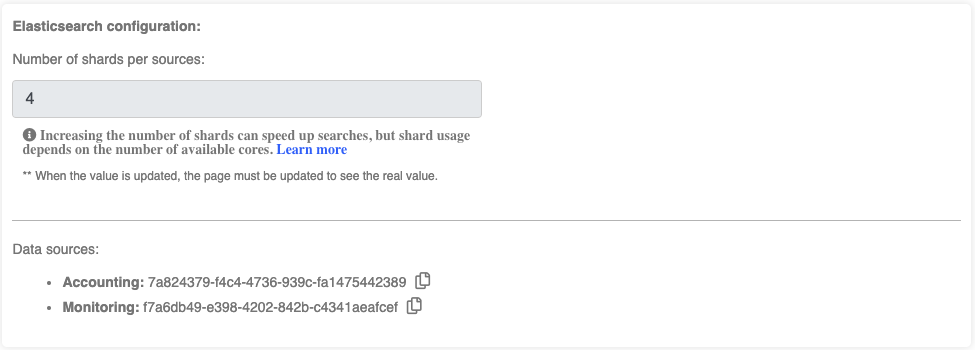
Identify required information from Management/Clusters page and OKA’s conf file:
Elasticsearch host and port: Required to access the database.
Cluster names: Required to be used as value for the new field to be created.
Index names for “Accounting” and “Monitoring”: Required to specify the indexes to update.
Save the following script as
update_cluster_uid_and_gpuhours.shupdate_cluster_uid_and_gpuhours.sh
#!/bin/bash

# Script to update Cluster_UID field for multiple Elasticsearch indexes
# and calculate GPU_hours for OKA Core index in each cluster

# ========================
# EDIT THIS SECTION
# ========================
# Default settings
ES_HOST="localhost"
ES_PORT="9200"

# Format: "cluster_name": ["index for Accounting", "index for Monitoring"]
read -r -d '' CONFIG << 'EOF'
{
    "cluster 1": ["Enter Accounting index", "Enter Monitoring index"],
    "cluster 2": ["Enter Accounting index", "Enter Monitoring index"],
    "cluster 3": ["Enter Accounting index", "Enter Monitoring index"]
}
EOF
# ========================
# END EDIT SECTION
# ========================

# Function to update Cluster_UID for regular indexes
add_cluster_uid_col() {
    local index=$1
    local cluster_uid=$2

    echo "Setting mapping for Cluster_UID in index '${index}'"
    curl -X PUT "http://${ES_HOST}:${ES_PORT}/${index}/_mapping" \
        -H "Content-Type: application/json" \
        -d '{
            "properties": {
                "Cluster_UID": {
                    "type": "text",
                    "fields": {
                        "keyword": {
                            "type": "keyword",
                            "ignore_above": 256
                        }
                    }
                }
            }
        }'

    echo "Updating index '${index}' with Cluster_UID '${cluster_uid}'"
    curl -X POST "http://${ES_HOST}:${ES_PORT}/${index}/_update_by_query?refresh=false&slices=auto&requests_per_second=-1" \
        -H "Content-Type: application/json" \
        -d "{
            \"script\": {
                \"source\": \"ctx._source[\\\"Cluster_UID\\\"] = \\\"${cluster_uid}\\\"\",
                \"lang\": \"painless\"
            },
            \"query\": {
                \"match_all\": {}
            }
        }"

    echo ""
}

# Function to update both Cluster_UID and GPU_hours for first index (combined operation)
add_cluster_uid_and_gpu_hours() {
    local index=$1
    local cluster_uid=$2

    echo "Setting mappings for Cluster_UID and GPU_hours in index '${index}'"
    curl -X PUT "http://${ES_HOST}:${ES_PORT}/${index}/_mapping" \
        -H "Content-Type: application/json" \
        -d '{
            "properties": {
                "Cluster_UID": {
                    "type": "text",
                    "fields": {
                        "keyword": {
                            "type": "keyword",
                            "ignore_above": 256
                        }
                    }
                },
                "GPU_hours": {
                    "type": "float"
                }
            }
        }'

    echo "Updating index '${index}' with Cluster_UID '${cluster_uid}' AND calculating GPU_hours"
    curl -X POST "http://${ES_HOST}:${ES_PORT}/${index}/_update_by_query?refresh=false&slices=auto&requests_per_second=-1" \
        -H "Content-Type: application/json" \
        -d "{
            \"script\": {
                \"source\": \"ctx._source['Cluster_UID'] = '${cluster_uid}'; if (ctx._source.containsKey('Allocated_GPU') && ctx._source.containsKey('Execution_Time') && ctx._source['Allocated_GPU'] != null && ctx._source['Execution_Time'] != null) { double gpu_hours = ctx._source['Allocated_GPU'] * (ctx._source['Execution_Time'] / 3600.0); ctx._source['GPU_hours'] = gpu_hours; } else { ctx._source['GPU_hours'] = 0.0; }\",
                \"lang\": \"painless\"
            },
            \"query\": {
                \"match_all\": {}
            }
        }"

    echo ""
}

# Process each cluster and its indexes
echo "Starting cluster UID updates and GPU hours calculations..."
echo "${CONFIG}" | jq -c 'to_entries[]' | while read -r entry; do
    cluster_uid=$(echo "${entry}" | jq -r '.key')
    read -ra indexes <<< "$(echo "${entry}" | jq -r '.value | @sh')"
    echo "Processing cluster: ${cluster_uid}"

    # Process first index with combined operation (Cluster_UID + GPU_hours) for OKA Core
    first_index=${indexes[0]}
    echo "Processing first index with combined operation: ${first_index}"
    add_cluster_uid_and_gpu_hours "${first_index}" "${cluster_uid}"

    # Process second index (if exists) with only Cluster_UID update for OKA Core Stats
    if [[ ${#indexes[@]} -eq 2 ]]; then
        second_index=${indexes[1]}
        echo "Processing second index with Cluster_UID only: ${second_index}"
        add_cluster_uid_col "${second_index}" "${cluster_uid}"
    fi

    echo "Completed processing for cluster: ${cluster_uid}"
    echo "----------------------------------------"
done

echo "All cluster UID updates and GPU hours calculations completed!"
Make the script executable:
chmod +x update_cluster_uid_and_gpuhours.sh
Edit the CONFIG section in the script to match your clusters and indexes
read -r -d '' CONFIG << 'EOF'
{
   "cluster name 1": ["index-uuid-1", "index-uuid-2"],
   "cluster name 2": ["index-uuid-3", "index-uuid-4"]
}
EOF
Run the script:
./update_cluster_uid_and_gpuhours.sh
Important
Depending on the size of your indexes, this process can take a significant amount of time. For reference, processing approximately 10 million documents typically takes 20-25 minutes.
Multi-Cluster
Note
If you arrived here from the release notes looking to enhance the data post update from OKA v2.7.0 or OKA v2.8.0, know that the following script will handle both GPU hours and Multicluster enhancement.
Question
What steps should I take to make my existing data compatible with multicluster support?
Answer
In order to fully take advantage of the multicluster functionality, documents stored in Elasticsearch indexes must contain a Cluster_UID field.
This will be used to identify the cluster the document is associated with and is essential for OKA to properly categorize and display log information within its different modules.
This field was added for JobScheduler logs as part of OKA v2.7.0 and OKA v2.8.0 for Occupancy specific data.
Logs ingested prior to those versions won’t have the required format to work properly in multicluster mode.
To add the missing Cluster_UID field to your existing documents, follow these steps:
Identify required information from Management/Clusters page and OKA’s conf file:
Elasticsearch host and port: Required to access the database.
Cluster names: Required to be used as value for the new field to be created.
Index names for “Accounting” and “Monitoring”: Required to specify the indexes to update. They are visible in Management/Clusters under the “Data sources” section:
Save the following script as
update_cluster_uid_and_gpuhours.shupdate_cluster_uid_and_gpuhours.sh
#!/bin/bash

# Script to update Cluster_UID field for multiple Elasticsearch indexes
# and calculate GPU_hours for OKA Core index in each cluster

# ========================
# EDIT THIS SECTION
# ========================
# Default settings
ES_HOST="localhost"
ES_PORT="9200"

# Format: "cluster_name": ["index for Accounting", "index for Monitoring"]
read -r -d '' CONFIG << 'EOF'
{
    "cluster 1": ["Enter Accounting index", "Enter Monitoring index"],
    "cluster 2": ["Enter Accounting index", "Enter Monitoring index"],
    "cluster 3": ["Enter Accounting index", "Enter Monitoring index"]
}
EOF
# ========================
# END EDIT SECTION
# ========================

# Function to update Cluster_UID for regular indexes
add_cluster_uid_col() {
    local index=$1
    local cluster_uid=$2

    echo "Setting mapping for Cluster_UID in index '${index}'"
    curl -X PUT "http://${ES_HOST}:${ES_PORT}/${index}/_mapping" \
        -H "Content-Type: application/json" \
        -d '{
            "properties": {
                "Cluster_UID": {
                    "type": "text",
                    "fields": {
                        "keyword": {
                            "type": "keyword",
                            "ignore_above": 256
                        }
                    }
                }
            }
        }'

    echo "Updating index '${index}' with Cluster_UID '${cluster_uid}'"
    curl -X POST "http://${ES_HOST}:${ES_PORT}/${index}/_update_by_query?refresh=false&slices=auto&requests_per_second=-1" \
        -H "Content-Type: application/json" \
        -d "{
            \"script\": {
                \"source\": \"ctx._source[\\\"Cluster_UID\\\"] = \\\"${cluster_uid}\\\"\",
                \"lang\": \"painless\"
            },
            \"query\": {
                \"match_all\": {}
            }
        }"

    echo ""
}

# Function to update both Cluster_UID and GPU_hours for first index (combined operation)
add_cluster_uid_and_gpu_hours() {
    local index=$1
    local cluster_uid=$2

    echo "Setting mappings for Cluster_UID and GPU_hours in index '${index}'"
    curl -X PUT "http://${ES_HOST}:${ES_PORT}/${index}/_mapping" \
        -H "Content-Type: application/json" \
        -d '{
            "properties": {
                "Cluster_UID": {
                    "type": "text",
                    "fields": {
                        "keyword": {
                            "type": "keyword",
                            "ignore_above": 256
                        }
                    }
                },
                "GPU_hours": {
                    "type": "float"
                }
            }
        }'

    echo "Updating index '${index}' with Cluster_UID '${cluster_uid}' AND calculating GPU_hours"
    curl -X POST "http://${ES_HOST}:${ES_PORT}/${index}/_update_by_query?refresh=false&slices=auto&requests_per_second=-1" \
        -H "Content-Type: application/json" \
        -d "{
            \"script\": {
                \"source\": \"ctx._source['Cluster_UID'] = '${cluster_uid}'; if (ctx._source.containsKey('Allocated_GPU') && ctx._source.containsKey('Execution_Time') && ctx._source['Allocated_GPU'] != null && ctx._source['Execution_Time'] != null) { double gpu_hours = ctx._source['Allocated_GPU'] * (ctx._source['Execution_Time'] / 3600.0); ctx._source['GPU_hours'] = gpu_hours; } else { ctx._source['GPU_hours'] = 0.0; }\",
                \"lang\": \"painless\"
            },
            \"query\": {
                \"match_all\": {}
            }
        }"

    echo ""
}

# Process each cluster and its indexes
echo "Starting cluster UID updates and GPU hours calculations..."
echo "${CONFIG}" | jq -c 'to_entries[]' | while read -r entry; do
    cluster_uid=$(echo "${entry}" | jq -r '.key')
    read -ra indexes <<< "$(echo "${entry}" | jq -r '.value | @sh')"
    echo "Processing cluster: ${cluster_uid}"

    # Process first index with combined operation (Cluster_UID + GPU_hours) for OKA Core
    first_index=${indexes[0]}
    echo "Processing first index with combined operation: ${first_index}"
    add_cluster_uid_and_gpu_hours "${first_index}" "${cluster_uid}"

    # Process second index (if exists) with only Cluster_UID update for OKA Core Stats
    if [[ ${#indexes[@]} -eq 2 ]]; then
        second_index=${indexes[1]}
        echo "Processing second index with Cluster_UID only: ${second_index}"
        add_cluster_uid_col "${second_index}" "${cluster_uid}"
    fi

    echo "Completed processing for cluster: ${cluster_uid}"
    echo "----------------------------------------"
done

echo "All cluster UID updates and GPU hours calculations completed!"
Edit the
CONFIGsection in the script to match your clusters and indexes# Format: "cluster_name": ["index for Accounting", "index for Monitoring"] read -r -d '' CONFIG << 'EOF' { "cluster 1": ["Enter Accounting index", "Enter Monitoring index"], "cluster 2": ["Enter Accounting index", "Enter Monitoring index"], "cluster 3": ["Enter Accounting index", "Enter Monitoring index"] } EOF
Make the script executable and run it
chmod +x update_cluster_uid_and_gpuhours.sh
./update_cluster_uid_and_gpuhours.sh
Important
Depending on the size of your indexes, this process can take a significant amount of time. For reference, processing approximately 10 million documents typically takes 20-25 minutes.
Question
Why is the unique user count incorrect in the Concurrent Users or KPI modules when using multiple clusters?
Answer
This is a known limitation when combining clusters that run different job schedulers.
OKA identifies users in job accounting data using one of two fields: User (a string username) or UID (a numeric Unix
user identifier). Depending on the scheduler, a cluster may expose one, the other, or both.
In a multi-cluster view, OKA inspects the Elasticsearch mapping across all selected clusters to decide which field to use. Because the mapping is the union of all clusters’ fields, a field appears to be available as soon as at least one cluster uses it — even if other clusters do not populate it.
As a result, the field selected for the count may be absent on some clusters, causing their jobs to be excluded and the unique user count to be lower than expected.
Warning
This is a known bug. There is currently no workaround. A fix is planned for a future version of OKA.