Cluster management
The Cluster management page allows administrators to create, configure, upload data to, and delete clusters.
Accessing Cluster management:
Locate the sidebar menu on the left side of the screen
Click on the
Managementsection (indicated by a gear icon at the bottom of the sidebar)Select
Clustersfrom the Management menu options
The page shows all clusters as a table. For each cluster, the table shows the last accounting ingestion date and the last monitoring ingestion date, along with per-source action buttons.
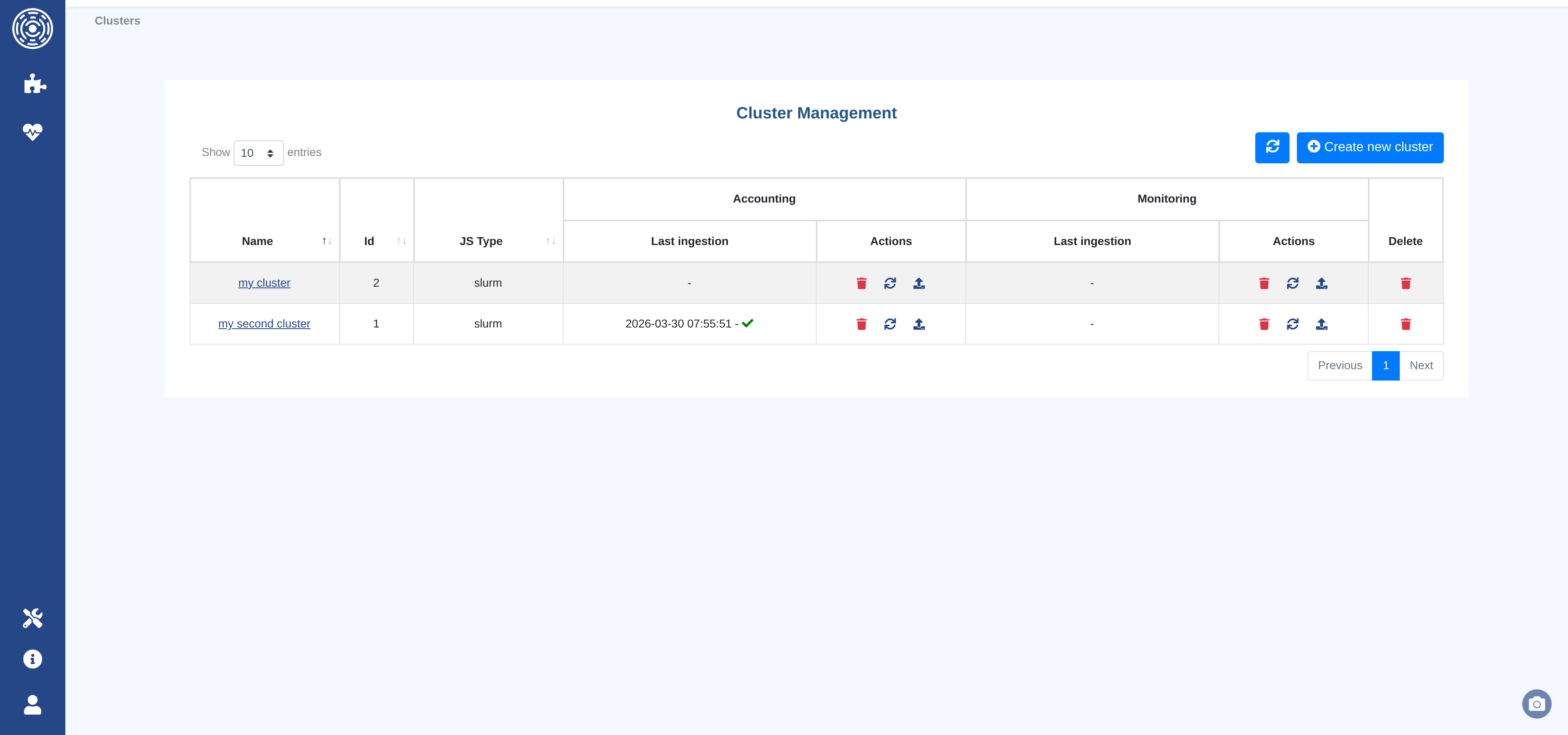
Available actions per row:
Edit — Open the cluster configuration form
Refresh — Trigger a manual data fetch from the job scheduler (or re-read from file)
Upload — Upload a data file directly from the browser
Delete data — Delete the ingested data for this source (accounting or monitoring)
Delete cluster — Permanently remove the cluster and all its data
At the top right of the page:
Refresh — Reload the cluster list
Create new cluster — Open the cluster creation form
Create or edit a cluster
The cluster configuration form is organized into five tabs: General tab, Hardware tab, Options tab, Accounting tab, and Monitoring tab.
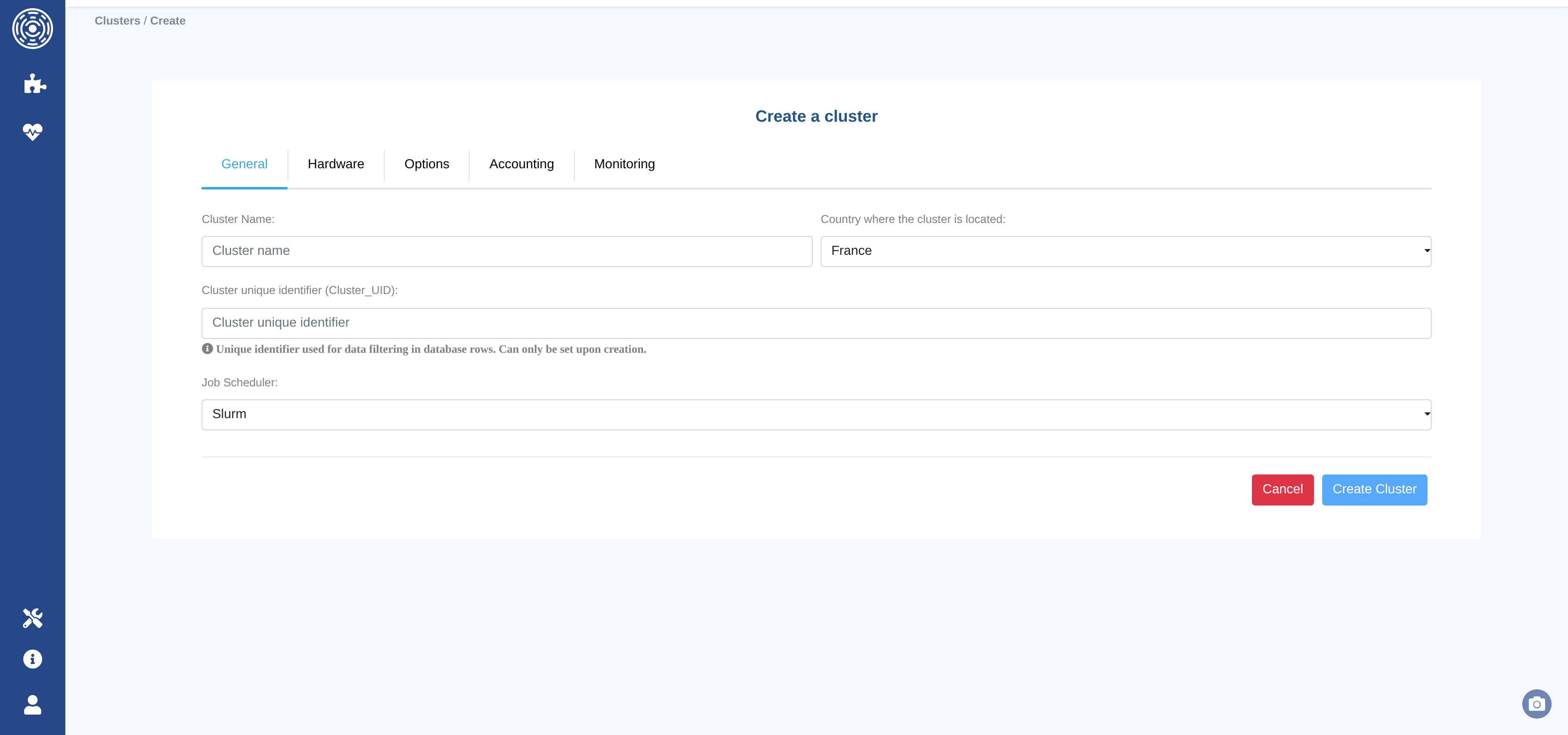
Once all required fields are filled in, click Create Cluster (or Update Cluster when editing). The button is disabled until at least one field has been changed.
Note
Most fields can be modified after creation. The only exception is the Cluster unique identifier, which is set once and cannot be changed.
General tab
The General tab contains the cluster’s identity settings.
Cluster Name (required) — A human-readable name for the cluster. Stored in lowercase.
Cluster unique identifier (required) — A short string used to tag every data row in the database. Choose this carefully: it cannot be modified after the cluster is created.
Job Scheduler (required) — The workload manager running on the cluster. Supported values:
slurm,Open Grid Engine,LSF,PBS,Torque.Country where the cluster is located — Used for geographic metadata. Defaults to
France.
Hardware tab
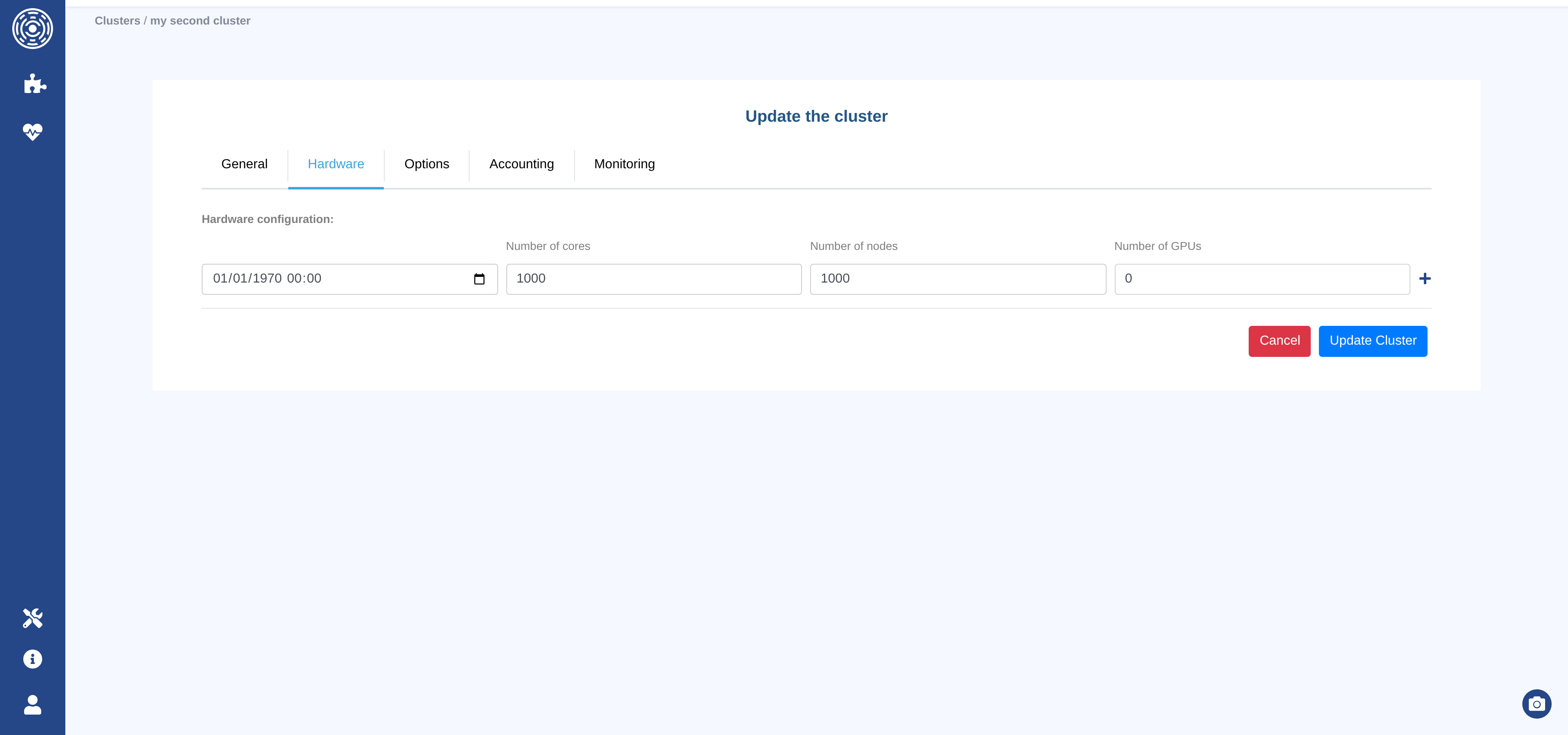
The Hardware tab records the cluster’s hardware capacity over time. Each entry represents a period during which the cluster had a given hardware configuration.
For each entry:
Date — When this configuration became active (format
YYYY-MM-DD HH:MM:SS). The first entry is pre-filled with1970-01-01 00:00:00to cover all historical data.Number of Cores — Total CPU cores in the cluster at that date.
Number of Nodes — Total compute nodes.
Number of GPUs — Total GPU accelerators (enter
0if the cluster has no GPUs).
Use the Add row button to record a hardware change (e.g., after a cluster expansion). Any row except the first can be removed with the Delete row button.
Note
Hardware configuration values are used to compute occupancy and utilization metrics (for example in the Load module). Keeping the history accurate ensures correct percentages for past periods.
Options tab
The Options tab defines per-core-hour default values used as fallbacks when a job record does not carry its own Cost, Energy, or CO₂ measurement.
Cost / Core-hour — Default cost per core-hour.
Currency — Currency for cost values (e.g.
EUR,USD,GBP…). Defaults toEUR.Energy (Wh) / Core-hour — Default energy consumption per core-hour.
CO₂ (kgCO₂e) / Core-hour — Default carbon footprint per core-hour.
Note
These values are applied selectively: fallback is applied only when the job’s
Cost / Energy / CO2 field is null and the option is set.
Setting any of these to 0 is valid and will be used as a fallback (returning 0),
while leaving the field blank means no substitute will be computed.
Example — cluster options: Cost “not set”, Energy = 0, CO₂ = 0.05
Field |
Job with value |
Job without value |
|---|---|---|
Cost |
Existing value used |
|
Energy |
Existing value used |
|
CO₂ |
Existing value used |
|
Accounting tab
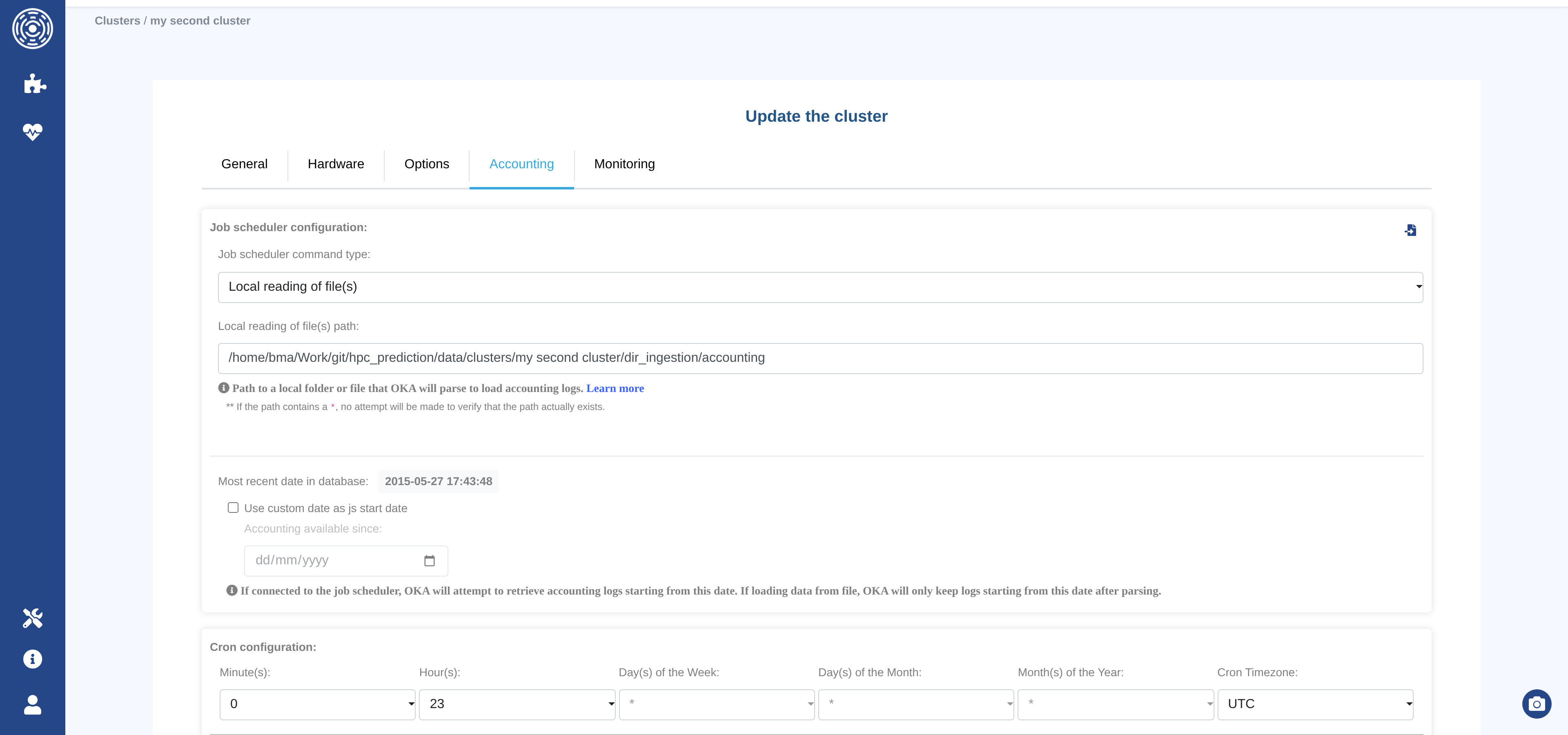
The Accounting tab configures how OKA ingests accounting logs (job history data) from the job scheduler.
Note
Accounting data drives most OKA modules: job counts, core-hours, cost, state distribution, throughput, and so on.
Job scheduler command type
Select the method OKA will use to retrieve accounting data:
Type |
Description |
|---|---|
|
OKA reads log files from a local directory or file path. |
|
OKA executes the job scheduler command directly on the OKA host. |
|
OKA connects to a remote host via SSH (password authentication) and runs the scheduler command there. |
|
OKA connects to a remote host via SSH (key-file authentication) and runs the scheduler command there. |
Copy to Monitoring button
The Copy configuration to ‘Monitoring’ button copies the current accounting connection settings (command type, hostname, username, password / key path) to the Monitoring tab. Use this shortcut when both sources share the same connection.
—
Fields visible when command type is FILE
Local reading of file(s) path — Path to a local file or directory that OKA will parse. Supported glob patterns:
/dir/pathor/dir/path/*— All files at the root of the given directory./dir/path/*.ext— All files with extension.extat the root./dir/path/**/*— All files recursively under the given directory./dir/path/**/*.ext— All files with extension.extrecursively.
Note
When the path contains a
*, OKA will not verify that the path exists at save time.
—
Fields visible when command type is FORWARDED_PWD or FORWARDED_KEYFILE
Hostname — The hostname or IP address of the machine running the job scheduler.
Username — The account to use for the SSH connection.
Password (FORWARDED_PWD only) — SSH password for the above account.
Key path (FORWARDED_KEYFILE only) — Path to the SSH private key file.
Warning
When using an SSH key, make sure it does not require a passphrase, otherwise OKA will be unable to authenticate.
—
Field visible when command type is LOCAL, FORWARDED_PWD, or FORWARDED_KEYFILE
Job scheduler timezone — Timezone used by the job scheduler when recording timestamps. Set this if the scheduler host is not in UTC; OKA uses it to avoid timezone mismatches during ingestion.
—
Accounting start date
Most recent date in database — Displays the most recent job date already stored for this cluster. OKA will use this as the starting point for the next incremental retrieval.
Use custom date as log start date — Check this box to override the start date for the next retrieval. When checked, an additional date picker appears:
Accounting available since — OKA will retrieve (or keep) accounting logs starting from this date. Useful for backfilling historical data or limiting the ingestion window.
—
Advanced configuration (job-scheduler-specific)
These fields appear automatically based on the selected job scheduler:
GPU complex (Open Grid Engine only) — Name of the Grid Engine complex that represents a GPU resource (default:
gpu). OKA uses this to extract GPU allocation data from OGE logs.License RegExp (PBS only) — A Python regular expression to extract license names from the
Resource_Listfield of PBS accounting records. The expression must contain a named capturing grouplicense_name.Example:
lic(?P<license_name>.+)Important
The named group must be called exactly
license_name. See the Python re documentation for syntax reference.
—
Cron configuration
Defines when the scheduled ingestion task runs. All fields accept multiple values.
Leaving a field at its default means “every” (* in cron notation).
Field |
Description |
|---|---|
Minute(s) |
Minutes within the hour. Quick presets: every 5 / 10 / 15 / 30 minutes. |
Hour(s) |
Hours (0–23). |
Day(s) of the Month |
Days (1–31). |
Day(s) of the Week |
Days (Sunday = 0, Saturday = 6). |
Month(s) of the Year |
Months (January–December). |
Cron Timezone |
Timezone in which the cron schedule is interpreted. Defaults to |
Enable — Check this box to activate the scheduled ingestion. Uncheck to pause it without losing the schedule configuration.
Note
Even with scheduled ingestion disabled, you can always trigger a manual ingestion using the Refresh button on the cluster list page.
—
Data enhancers
Select one or more published Data Enhancers to run after each ingestion. Enhancers are applied in the order they appear in the selection — reorder them accordingly.
The test sandbox (bug icon next to the header, only visible when editing an existing cluster) lets you run the selected enhancers against a sample of real data before saving.
—
Elasticsearch configuration
Number of shards — Number of Elasticsearch shards for the accounting index. Default:
4. Increasing this value can speed up searches on very large datasets, but requires more Elasticsearch resources.Note
Changing this value after initial data ingestion requires re-indexing. After saving, reload the page to see the value actually applied to the Elasticsearch index.
Monitoring tab
The Monitoring tab configures ingestion of node-level monitoring data (real-time resource usage snapshots produced by the job scheduler). Its structure mirrors the Accounting tab tab with the following differences:
No Accounting start date — Monitoring data is always ingested incrementally from the last known record; there is no custom start date option.
No Job scheduler timezone — Monitoring data timestamps are handled differently and do not require a separate timezone override.
No Advanced configuration — GPU complex and License RegExp do not apply to monitoring data.
Default Elasticsearch shards: 1 — Monitoring indices are typically smaller than accounting indices, so a single shard is the default.
All other fields (command type, connection settings, file path, cron schedule, data enhancers, Elasticsearch shards) work identically to the Accounting tab.
Note
Not all job schedulers produce monitoring data. If your scheduler does not support it, you can leave this tab unconfigured.
Upload data
Note
Parsing and ingestion are always handled by an asynchronous background task.
UI
The Upload button on the cluster list opens a file upload dialog. Select a file and click Upload Data.
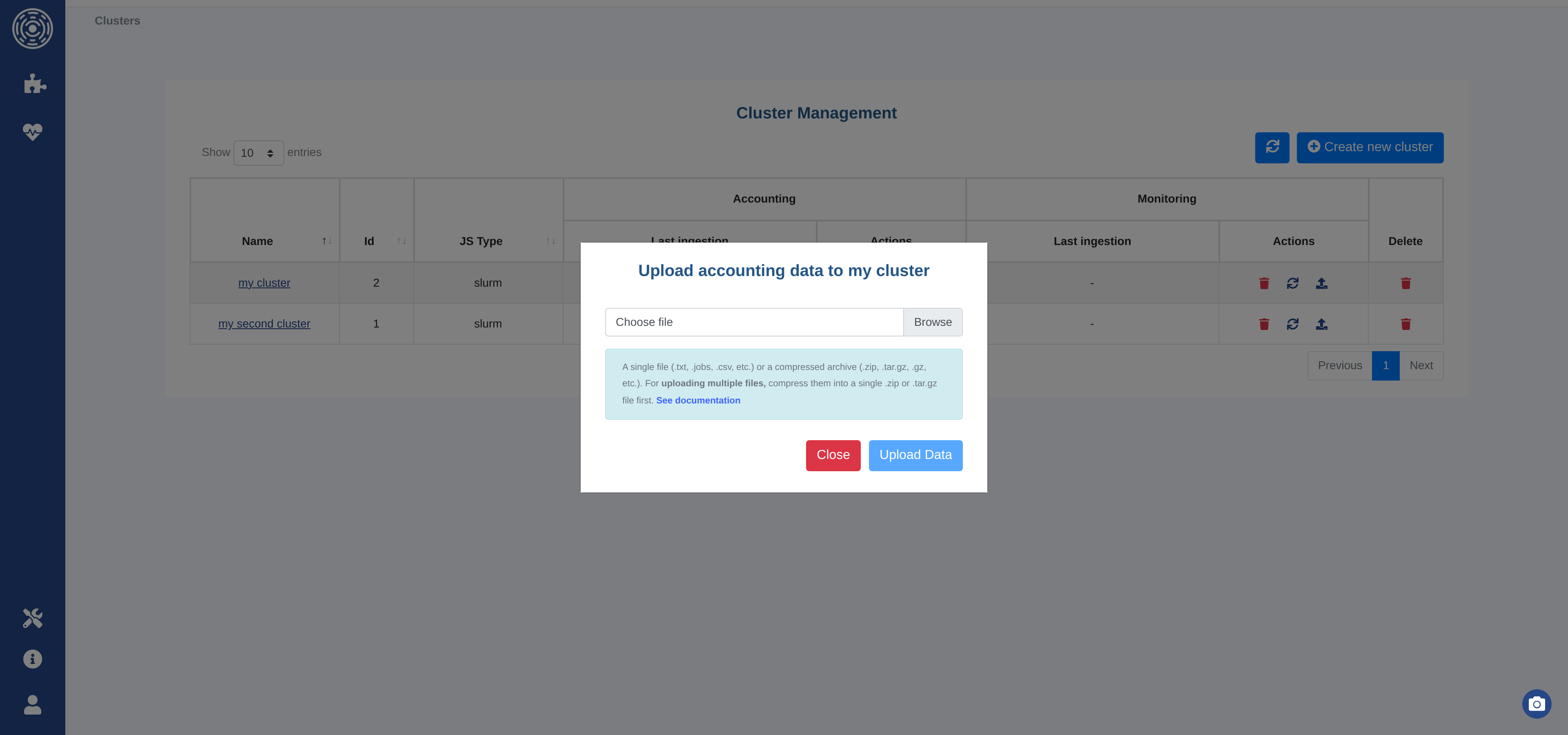
Accounting data — Accepted formats:
Single log file:
.txt,.jobs,.csvCompressed archive:
.zip,.tar.gz,.gz
Monitoring data — Accepted formats:
Single log file:
.txt,.nodesCompressed archive:
.zip,.tar.gz,.gz
For monitoring files, the filename must follow the convention:
hostname_<date>[.txt|.nodes]
(e.g. hostname_2025-06-11_08:30:02.txt).
To upload multiple files at once, compress them into a single .zip or .tar.gz archive.
Warning
Files uploaded via the UI must not exceed 1 GB. For larger datasets, use the scheduled ingestion path or the file-based ingestion directory instead. See File upload limitation for details.
The Refresh button triggers a manual ingestion without uploading a new file:
For
FILEingestion — Re-reads the configured file or directory path.For
LOCAL/FORWARDED_*ingestion — Executes the scheduler command to fetch the latest records.
Scheduled ingestion
When the Enable checkbox in the cron configuration is active, OKA automatically runs ingestion according to the configured schedule.
FILE — OKA parses all files available at the configured path. Files are not deleted after ingestion; already-ingested files are skipped automatically.
LOCAL / FORWARDED — OKA executes the scheduler command to retrieve records from the last known submission date onward. If no data exists yet, it attempts to retrieve the full history.
Warning
If you have more than a year of history to retrieve, start with file-based ingestion (month by month) to avoid memory and time issues, then switch to scheduled command execution once the database is up to date. See Retrieve job scheduler data for data extraction scripts. Contact UCit Support if you need assistance.
Delete data or a cluster
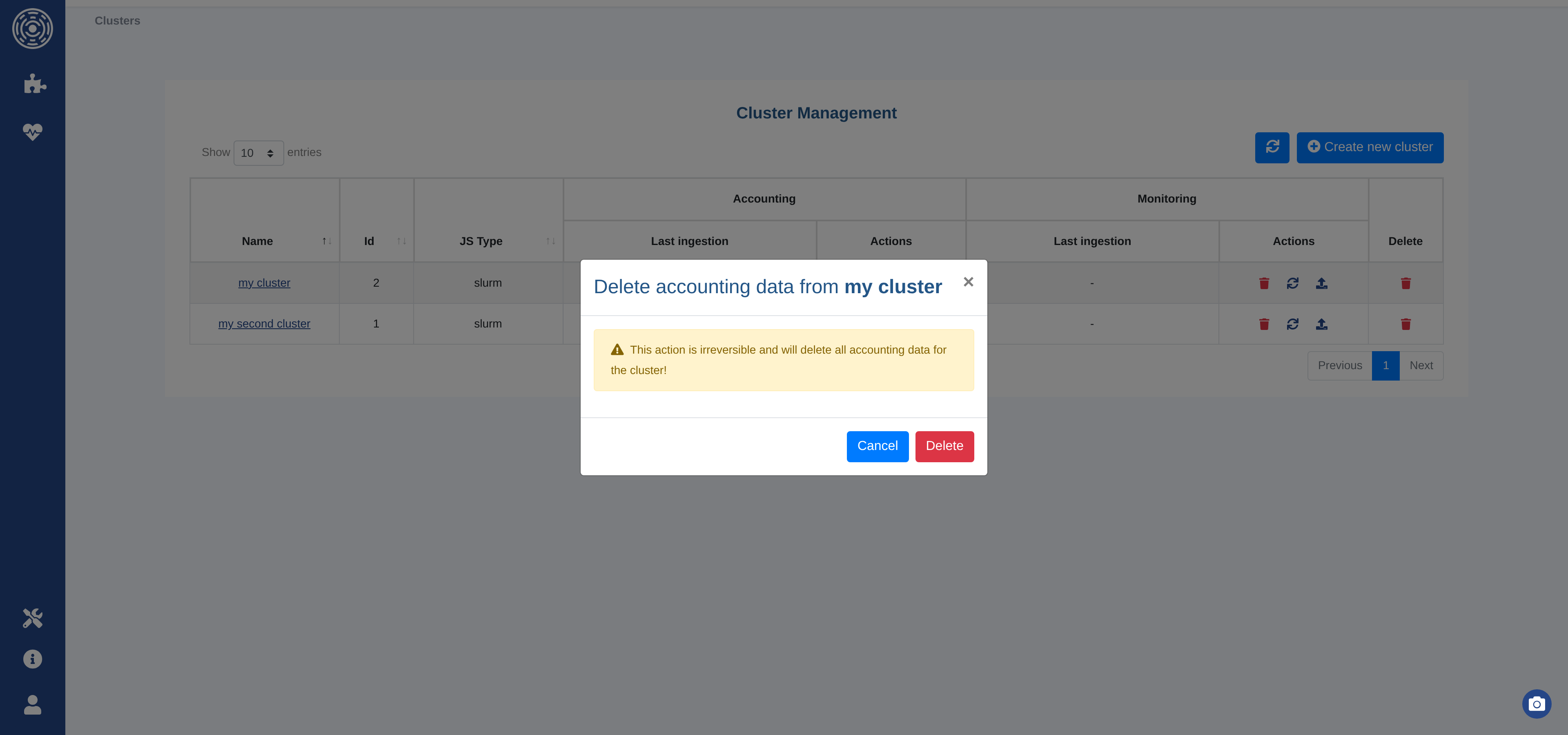
You can delete the data associated with a cluster (accounting or monitoring independently) or permanently remove the entire cluster using the action buttons in the cluster list.
A confirmation dialog is shown before any destructive action.
Retrieve job scheduler data
If the cluster is configured with FILE ingestion, you need to export the logs from
your job scheduler and copy them to the configured ingestion directory.
Accounting
GE/SGE/OGE — Logs are stored in
${SGE_ROOT}/${SGE_CELL}/common/accounting(e.g./usr/share/gridengine/default/common/accounting). You can use this file directly or use the extraction script below:extractSGEData.sh
#!/bin/bash
################################################################################
# Copyright (c) 2017-2026 UCit SAS
# All Rights Reserved
#
# This software is the confidential and proprietary information
# of UCit SAS ("Confidential Information").
# You shall not disclose such Confidential Information
# and shall use it only in accordance with the terms of
# the license agreement you entered into with UCit.
################################################################################
START="2013-01-01T00:00:00"
CLEAN="yes"
if [[ -z "${SGE_ROOT}" ]] || [[ -z "${SGE_CELL}" ]]; then
  GEACCTFILE="/usr/share/gridengine/default/common/accounting"
else
  GEACCTFILE="${SGE_ROOT}/${SGE_CELL}/common/accounting"
fi

CURDATE=$(date "+%Y-%m-%dT%H:%M:%S")
FILENAME="$(hostname)_${CURDATE}"
TARBALL=0

set -a

function unknownName() {
  local _prefix="$1"
  local _name="$2"

  # is name in dict?
  local _dictname
  _dictname=$(grep -e "^${_name}=${_prefix}.*" "${tmpdictfile}" | awk -F '=' '{print $2}')

  if [[ -z "${_dictname}" ]]; then
    namecount=$(grep -e "${_prefix}=.*" "${tmpcntfile}" | awk -F '=' '{print $2}')
    namecount=$((namecount+1))
    safeid="${_prefix}_${namecount}"

    echo "${_name}=${safeid}" >> "${tmpdictfile}"
    echo "${_prefix}=${namecount}" > "${tmpcntfile}"
  else
    safeid="${_dictname}"
  fi
}

function getuid() {
  local _begline="$1"
  local _name="$2"
  local _endline="$3"
  safeid=$(id -u "${_name}" 2>/dev/null)
  rv=$?
  if [[ ${rv} -ne 0 ]] || [[ -z "${safeid}" ]]; then
    unknownName "unknownuser" "${_name}"
  fi
  echo "${_begline}${safeid}${_endline}"
}

function getgid() {
  local _begline="$1"
  local _name="$2"
  local _endline="$3"
  safeid=$(getent group "${_name}"  2>/dev/null | cut -d: -f3)
  rv=$?
  if [[ ${rv} -ne 0 ]] || [[ -z "${safeid}" ]]; then
    unknownName "unknowngroup" "${_name}"
  fi
  echo "${_begline}${safeid}${_endline}"
}


while [[ $# -ge 1 ]]; do
    key="$1"

    case ${key} in
        -s|--start)
            START="$2"
            shift # past argument
            ;;
        -a|--all)
            CLEAN="no"
            ;;
        -c|--clean)
            CLEAN="yes"
            ;;
        -f|--file)
            GEACCTFILE="$2"
            shift
            ;;
        -o|--output)
            FILENAME="${2}"
            shift # past argument
            ;;
        -t|--tgz)
            TARBALL=1
            ;;
        -h|--help)
            echo "$0 [-s|--start DATE_TIME] [-a|--all] [-c|--clean] [-f|--file ACCOUNTINGFILE] [-o|--output FILENAME] [-t|--tgz] [-h|--help]"
            echo "Extract historical data from GE, and create the following files:"
            echo "- ${FILENAME}.jobs: historical data on jobs"
            echo "- ${FILENAME}.nodes: current nodes description"
            echo "- ${FILENAME}.partitions: current partitions description"
            echo
            echo "-s|--start: start date and time (format: YYYY-MM-DDThh:mm:ss, default is ${START})"
            echo "-a|--all: print all fields"
            echo "-c|--clean: do not print usernames and group names (this is the default)"
            echo "-f|--file: path to GE accounting file (default is ${GEACCTFILE}"
            echo "-o|--output: output filename (extensions will be added: .job, .nodes, .partitions)"
            echo "-t|--tgz: create a tarball and print its path to stdout"
            echo "-h|--help: print this help"
            echo
            echo "\${SGE_ROOT} and \${SGE_CELL} must be set"
            exit 0
            ;;
        *)
            echo "Unknown option: ${key}"
            exit 1
            ;;
    esac
    shift # past argument or value
done

# TODO handle start and end dates
# nstart=$(echo "${START}" | awk -F'T' '{print $1}')
# dstart=$(date --date="${nstart}" +%s)


if [[ ! -f "${GEACCTFILE}" ]]; then
    echo "${GEACCTFILE} accounting file does not exist."
    echo "Please use the -f parameter to specify the correct accounting file."
    exit 1
fi

cp "${GEACCTFILE}" "${FILENAME}.jobs"


# Replace usernames by uid, and groupnames by gid
if [[ "${CLEAN}" == "yes" ]]; then
  tmpcntfile=$(mktemp)
  tmpdictfile=$(mktemp)

  sed -i.bak -r -e 's#([^:]*:[^:]*:)([^:]+)(.*)# getuid "\1" "\2" "\3"#e' -e 's#([^:]*:[^:]*:[^:]*:)([^:]+)(.*)# getgid "\1" "\2" "\3"#e' "${FILENAME}.jobs"
  rm -f "${FILENAME}.jobs.bak"
  rm -f "${tmpcntfile}"
  rm -f "${tmpdictfile}"
fi
if [[ "${TARBALL}" -ne 1 ]]; then
  echo "${FILENAME}.jobs created"
fi


# Gather nodes
for i in $(qconf -sel); do
  qconf -se "${i}" >> "${FILENAME}.nodes"
done
if [[ "${TARBALL}" -ne 1 ]]; then
  echo "${FILENAME}.nodes created"
fi

# # Gather configuration
# qconf -sconf > "${FILENAME}.conf"

# Gather list of queues
for i in $(qconf -sql); do
  qconf -sq "${i}" >> "${FILENAME}.partitions"
done

# Gather list of parallel environments (not exactly queues, but necessary to run // jobs)
cat >> "${FILENAME}.partitions" <<EOF
## Parallel environments
EOF
for i in $(qconf -spl); do
  qconf -sp "${i}" >> "${FILENAME}.partitions"
done
if [[ "${TARBALL}" -ne 1 ]]; then
  echo "${FILENAME}.partitions created"
fi


if [[ "${TARBALL}" -eq 1 ]]; then
  tgzfiles=("${FILENAME}.jobs" "${FILENAME}.nodes" "${FILENAME}.partitions")
  tar --force-local -zcf "${FILENAME}.tgz" "${tgzfiles[@]}"
  echo "${FILENAME}.tgz"
  rm -f "${tgzfiles[@]}"
fi
LSF — Logs are stored in multiple files under
${LSB_SHAREDIR}/cluster_name/logdir.PBS / OpenPBS / Torque — Logs are in an
accountingdirectory, typically:Torque:
/var/spool/torque/server_priv/accounting/(Open)PBS:
/var/spool/pbs/server_priv/accounting/
You can use these files directly or use the extraction script below:
extractPBSTorqueData.sh
#!/bin/bash
################################################################################
# Copyright (c) 2017-2026 UCit SAS
# All Rights Reserved
#
# This software is the confidential and proprietary information
# of UCit SAS ("Confidential Information").
# You shall not disclose such Confidential Information
# and shall use it only in accordance with the terms of
# the license agreement you entered into with UCit.
################################################################################

START="2010-01-01T00:00:00"
CLEAN="yes"
TORQUEDIR="/var/spool/torque/server_priv/accounting/"
PBSDIR="/var/spool/pbs/server_priv/accounting/"
ACCOUNTINGDIR=""

CURDATE=$(date "+%Y-%m-%dT%H:%M:%S")
FILENAME="$(hostname)_${CURDATE}"
TARBALL=0

set -a

function unknownName() {
  local _prefix="$1"
  local _name="$2"

  # is name in dict?
  local _dictname
  _dictname=$(grep -e "^${_name}=${_prefix}.*" "${tmpdictfile}" | awk -F '=' '{print $2}')

  if [[ -z "${_dictname}" ]]; then
    namecount=$(grep -e "${_prefix}=.*" "${tmpcntfile}" | awk -F '=' '{print $2}')
    namecount=$((namecount+1))
    safeid="${_prefix}_${namecount}"

    echo "${_name}=${safeid}" >> "${tmpdictfile}"
    echo "${_prefix}=${namecount}" > "${tmpcntfile}"
  else
    safeid="${_dictname}"
  fi
}

function getuid() {
  local _begline="$1"
  local _name="$2"
  local _endline="$3"
  safeid=$(id -u "${_name}" 2>/dev/null)
  rv=$?
  if [[ ${rv} -ne 0 ]] || [[ -z "${safeid}" ]]; then
    unknownName "unknownuser" "${_name}"
  fi
  echo "${_begline}${safeid}${_endline}"
}

function getgid() {
  local _begline="$1"
  local _name="$2"
  local _endline="$3"
  safeid=$(getent group "${_name}"  2>/dev/null | cut -d: -f3)
  rv=$?
  if [[ ${rv} -ne 0 ]] || [[ -z "${safeid}" ]]; then
    unknownName "unknowngroup" "${_name}"
  fi
  echo "${_begline}${safeid}${_endline}"
}


while [[ $# -ge 1 ]]; do
    key="$1"

    case ${key} in
        -s|--start)
            START="$2"
            shift # past argument
            ;;
        -a|--all)
            CLEAN="no"
            ;;
        -c|--clean)
            CLEAN="yes"
            ;;
        -d|--directory)
            ACCOUNTINGDIR="$2"
            shift
            ;;
        -o|--output)
            FILENAME="${2}"
            shift # past argument
            ;;
        -t|--tgz)
            TARBALL=1
            ;;
        -h|--help)
            echo "$0 [-s|--start DATE_TIME] [-a|--all] [-c|--clean] [-d|--directory DIR] [-o|--output FILENAME] [-t|--tgz] [-h|--help]"
            echo "Extract historical data from Torque/PBS, and create the following files:"
            echo "- ${FILENAME}.jobs: historical data on jobs"
            echo "- ${FILENAME}.nodes: current nodes description"
            echo "- ${FILENAME}.partitions: current partitions description"
            echo
            echo "-s|--start: start date and time (format: YYYY-MM-DDThh:mm:ss, default is ${START})"
            echo "-a|--all: print all fields"
            echo "-c|--clean: do not print usernames and group names (this is the default)"
            echo "-d|--directory: path to Torque/PBS accounting directory (default is ${TORQUEDIR} for Torque, and ${PBSDIR} for PBS)"
            echo "-o|--output: output filename (extensions will be added: .job, .nodes, .partitions)"
            echo "-t|--tgz: create a tarball and print its path to stdout"
            echo "-h|--help: print this help"
            exit 0
            ;;
        *)
            echo "Unknown option: ${key}"
            exit 1
            ;;
    esac
    shift # past argument or value
done


nstart=$(echo "${START}" | awk -F'T' '{print $1}')
dstart=$(date --date="${nstart}" +%s)

version=$(pbsnodes --version 2>&1 |head -n 1 | grep pbs_version)
if [[ -n "${version// /}" ]]; then
  # PBS
  ISPBS="True"
else
  ISPBS="False"
fi

if [[ -z "${ACCOUNTINGDIR}" ]]; then
    if [[ "${ISPBS}" == "True" ]]; then
      ACCOUNTINGDIR="${PBSDIR}"
    else
      ACCOUNTINGDIR="${TORQUEDIR}"
    fi
fi

if [[ ! -d "${ACCOUNTINGDIR}" ]]; then
    echo "${ACCOUNTINGDIR} directory does not exist. Please use the -d parameter to specify the correct accounting directory."
    exit 1
fi

echo > "${FILENAME}.jobs"
for f in "${ACCOUNTINGDIR}"/[0-9][0-9][0-9][0-9][0-9][0-9][0-9][0-9];do
    f=$(basename "${f}")
    df=$(date --date="${f}" +%s)

    if [[ "${df}" -lt "${dstart}" ]]; then
        continue
    fi

    grep -E "^[0-9]{2}/[0-9]{2}/[0-9]{4}\s[0-9]{2}:[0-9]{2}:[0-9]{2};[EDA];[^;]+;.*" "${ACCOUNTINGDIR}/${f}" >> "${FILENAME}.jobs"
done


# Replace usernames by uid, and groupnames by gid
if [[ "${CLEAN}" == "yes" ]]; then
  tmpcntfile=$(mktemp)
  tmpdictfile=$(mktemp)

  sed -i.bak -r -e 's#(.*user=)([[:alnum:]_-]*)(.*)# getuid "\1" "\2" "\3"#e' -e 's#(.*group=)([[:alnum:]_-]*)(.*)# getgid "\1" "\2" "\3"#e' -e 's#(.*owner=)([[:alnum:]_-]*)(.*)# getuid "\1" "\2" "\3"#e' -e 's#(.*requestor=)([[:alnum:]_-]*)(@.+)# getuid "\1" "\2" "\3"#e' "${FILENAME}.jobs"
  rm -f "${FILENAME}.jobs.bak"
  rm -f "${tmpcntfile}"
  rm -f "${tmpdictfile}"
fi


if [[ "${TARBALL}" -ne 1 ]]; then
  echo "${FILENAME}.jobs created"
fi

if [[ "${ISPBS}" == "True" ]]; then
    # PBS
    pbsnodes -a -F json > "${FILENAME}.nodes"
else
    # Torque
    pbsnodes -ax > "${FILENAME}.nodes"
fi

if [[ "${TARBALL}" -ne 1 ]]; then
  echo "${FILENAME}.nodes created"
fi

qstat -f -Q > "${FILENAME}.partitions"
if [[ "${TARBALL}" -ne 1 ]]; then
  echo "${FILENAME}.partitions created"
fi

if [[ "${TARBALL}" -eq 1 ]]; then
  tgzfiles=("${FILENAME}.jobs" "${FILENAME}.nodes" "${FILENAME}.partitions")
  tar --force-local -zcf "${FILENAME}.tgz" "${tgzfiles[@]}"
  echo "${FILENAME}.tgz"
  rm -f "${tgzfiles[@]}"
fi
SLURM — Logs are accessible via
sacct. Use the script below with--data accounting:extractSlurmData.sh
#!/bin/bash
################################################################################
# Copyright (c) 2017-2026 UCit SAS
# All Rights Reserved
#
# This software is the confidential and proprietary information
# of UCit SAS ("Confidential Information").
# You shall not disclose such Confidential Information
# and shall use it only in accordance with the terms of
# the license agreement you entered into with UCit.
################################################################################

START="2010-01-01T00:00:00"

FORMAT=""

CURDATE=$(date "+%Y-%m-%dT%H:%M:%S")
FILENAME="$(hostname)_${CURDATE}"
TARBALL=0
EXTRACT_MODE="all"  # Options: all, acct (accounting: .jobs), mon (monitoring: .nodes, .partitions)

# Setup basic access to slurm bin sacct and scontrol
DEFAULT_SLURM_PATH="/opt/slurm/bin"

if ! SCONTROL=$(command -v scontrol 2>/dev/null); then
    SCONTROL="${DEFAULT_SLURM_PATH}/scontrol"
fi

if ! SACCT=$(command -v sacct 2>/dev/null); then
    SACCT="${DEFAULT_SLURM_PATH}/sacct"
fi

while [[ $# -ge 1 ]]; do
    key="$1"

    case ${key} in
        -s|--start)
            START="$2"
            shift # past argument
            ;;
        -e|--end)
            END="$2"
            shift # past argument
            ;;
        -b|--batch)
            BATCHDURATION="$2"
            shift # past argument
            ;;
        -a|--all)
            FORMAT="ALL"
            ;;
        -o|--output)
            FILENAME="${2}"
            shift # past argument
            ;;
        -p|--path)
            # Force specific path to look for slurm bin sacct and scontrol
            SCONTROL="${2}/scontrol"
            SACCT="${2}/sacct"
            shift # past argument
            ;;
        -t|--tgz)
            TARBALL=1
            ;;
        -d|--data)
            case "$2" in
                all)
                    EXTRACT_MODE="all"
                    ;;
                acct|accounting)
                    EXTRACT_MODE="acct"
                    ;;
                mon|monitoring)
                    EXTRACT_MODE="mon"
                    ;;
                *)
                    echo "Unknown data mode: $2. Valid options: all, acct (accounting), mon (monitoring)"
                    exit 1
                    ;;
            esac
            shift # past argument
            ;;
        -h|--help)
            echo "$0 [-s|--start DATE_TIME] [-e|--end DATE_TIME] [-b|--batch DAYS] [-a|--all] [-d|--data MODE] [-o|--output FILENAME] [-t|--tgz] [-p|--path PATH] [-h|--help]"
            echo "Extract historical data from SLURM, and create the following files:"
            echo "- ${FILENAME}.jobs: historical data on jobs (accounting)"
            echo "- ${FILENAME}.nodes: current nodes description (monitoring)"
            echo "- ${FILENAME}.partitions: current partitions description (monitoring)"
            echo
            echo "-s|--start: start date and time (format: YYYY-MM-DDThh:mm:ss, default is ${START})"
            echo "-e|--end: end date and time (format: YYYY-MM-DDThh:mm:ss)"
            echo "-b|--batch: number of days for the batch size. Split whole duration in 'x' smaller batches to run consecutive"
            echo "  small sacct instead of a big request."
            echo "-a|--all: print all fields"
            echo "-d|--data: data extraction mode (default: all)"
            echo "  all: extract all data (.jobs, .nodes, .partitions)"
            echo "  acct|accounting: extract accounting data only (.jobs)"
            echo "  mon|monitoring: extract monitoring data only (.nodes)"
            echo "-o|--output: output filename (extensions will be added: .jobs, .nodes, .partitions)"
            echo "-t|--tgz: create a tarball and print its path to stdout"
            echo "-p|--path: path to slurm bin folder where scontrol and sacct can be found"
            echo "-h|--help: print this help"
            exit 0
            ;;
        *)
            echo "Unknown option: ${key}"
            exit 1
            ;;
    esac
    shift # past argument or value
done

# Slurm version
SLURM_VERSION=$("${SCONTROL}" --version| awk '{print $2}')
SV_MAJOR=$(echo "${SLURM_VERSION}" | cut -d '.' -f 1)

# Check if format=ALL requested
if [[ "${FORMAT}" != "ALL" ]]; then
    FIELDS=$("${SACCT}" --helpformat)
    # Then check based on available entry on slurm what we can actually retrieve.
    declare -a FIELDS_ARRAY
    while IFS=' ' read -r -a array;
    do
        FIELDS_ARRAY+=("${array[@]}");
    done < <(echo "${FIELDS}")

    declare -a UNWANTED_FIELDS=("User" "Group")

    for element in "${FIELDS_ARRAY[@]}"
    do
        if [[ ! ${UNWANTED_FIELDS[*]} =~ (^|[[:space:]])"${element}"($|[[:space:]]) ]]; then
            FORMAT+="${element},"
        fi
    done
fi

# Set sacct options depending on the version of SLURM
declare -a SACCTOPT
SACCTOPT=("--duplicates" "--allusers" "--parsable2" "--format" "${FORMAT}")

if [[ ${SV_MAJOR} -gt 14 ]]; then
    # supported since version 15
    SACCTOPT+=("--delimiter=@|@")
fi

# Set END if not defined
if [[ -z "${END}" ]]; then
    END=$(date +"%Y-%m-%dT%H:%M:%S")
fi

# Array to track generated files for tarball
declare -a tgzfiles=()

# Extract accounting data (.jobs) if mode is 'all' or 'acct'
if [[ "${EXTRACT_MODE}" == "all" || "${EXTRACT_MODE}" == "acct" ]]; then
    #sacct by batch or just once
    if [[ -n "${BATCHDURATION}" && "${BATCHDURATION}" -gt 0 ]]; then
        ## Compute start & end date lists
        # convert to seconds:
        START_SEC=$(date +%s --date "${START}")
        END_SEC=$(date +%s --date "${END}")
        BATCHDURATION_SEC=$((BATCHDURATION*(3600*24)))

        # create date lists
        startlist=()
        endlist=()
        # Slurm sacct works with inclusive limits [start, end]
        # https://rc.byu.edu/wiki/?id=Using+sacct
        # The algorithm does: [start, (start2-1second)], [start2, (start3-1second)], [start3, end]
        # Tested on Slurm 20.
        CUR_DATE_SEC=${START_SEC}
        if (( BATCHDURATION_SEC < (END_SEC-START_SEC) )); then  # Batchduration is smaller than the whole duration
            while ((CUR_DATE_SEC < (END_SEC-BATCHDURATION_SEC) ));do
                CUR_DATE_SEC_FORM=$(date -d @"${CUR_DATE_SEC}" +"%Y-%m-%dT%H:%M:%S")
                startlist+=("${CUR_DATE_SEC_FORM}")
                # get end date:
                ((CUR_DATE_SEC+=BATCHDURATION_SEC))
                ((CUR_END_DATE_SEC=CUR_DATE_SEC-1))
                CUR_DATE_SEC_FORM_END=$(date -d @"${CUR_END_DATE_SEC}" +"%Y-%m-%dT%H:%M:%S")
                endlist+=("${CUR_DATE_SEC_FORM_END}")
            done
        fi
        # Add last date
        startlist+=("$(date -d @"${CUR_DATE_SEC}" +"%Y-%m-%dT%H:%M:%S")")
        endlist+=("${END}")


        ## Make sure not to concat previous call with new one. It needs to be handled manually.
        ## Otherwise, we might have multiple time the same result if we run the script with -b and
        ## but different duration or date leading to having multiple time the same jobs ?
        rm -f "${FILENAME}.jobs"

        ## consecutive sacct
        compt=-1
        for i in "${startlist[@]}";do
            ((compt+=1))
            SACCTOPTDATES=()
            SACCTOPTDATES+=("--starttime" "${i}" "--endtime" "${endlist[${compt}]}")
            if [[ ${compt} -gt 0 ]]; then
                SACCTOPTDATES+=("--noheader")
            fi
            "${SACCT}" "${SACCTOPT[@]}" "${SACCTOPTDATES[@]}" >> "${FILENAME}.jobs"
        done

    else
        SACCTOPT+=("--starttime" "${START}" "--endtime" "${END}")
        # TZ=UTC => For now we'll remove the timezone
        "${SACCT}" "${SACCTOPT[@]}" > "${FILENAME}.jobs"
    fi

    tgzfiles+=("${FILENAME}.jobs")
    if [[ "${TARBALL}" -ne 1 ]]; then
      echo "${FILENAME}.jobs created"
    fi
fi

# Extract monitoring data (.nodes) if mode is 'all' or 'mon'
if [[ "${EXTRACT_MODE}" == "all" || "${EXTRACT_MODE}" == "mon" ]]; then
    "${SCONTROL}" -a -o -ddd show node > "${FILENAME}.nodes"
    tgzfiles+=("${FILENAME}.nodes")
    if [[ "${TARBALL}" -ne 1 ]]; then
      echo "${FILENAME}.nodes created"
    fi
fi

# Extract partitions data (.partitions) only if mode is 'all'
if [[ "${EXTRACT_MODE}" == "all" ]]; then
    "${SCONTROL}" -o -a -ddd show part > "${FILENAME}.partitions"
    tgzfiles+=("${FILENAME}.partitions")
    if [[ "${TARBALL}" -ne 1 ]]; then
      echo "${FILENAME}.partitions created"
    fi
fi

if [[ "${TARBALL}" -eq 1 ]]; then
  tar --force-local -zcf "${FILENAME}.tgz" "${tgzfiles[@]}"
  echo "${FILENAME}.tgz"
  rm -f "${tgzfiles[@]}"
fi
Note
The extraction scripts can retrieve both accounting and monitoring data.
Use --data accounting when you only need accounting logs.
Monitoring
LSF — Use one of the following scripts to retrieve LSF monitoring data:
extractLSFNode_json.sh
#!/bin/bash
################################################################################
# Copyright (c) 2017-2026 UCit SAS
# All Rights Reserved
#
# This software is the confidential and proprietary information
# of UCit SAS ("Confidential Information").
# You shall not disclose such Confidential Information
# and shall use it only in accordance with the terms of
# the license agreement you entered into with UCit.
################################################################################
# Run the commands and capture their output.
nodes_output=$(bhosts -X -o 'HOST_NAME status run max NJOBS' -alloc -json)
lsload_output=$(lsload -o 'HOST_NAME status r1m mem' -json)
lshosts_output=$(lshosts -o 'HOST_NAME type model cpuf ncpus maxmem maxswp server RESOURCES ndisks rexpri nprocs ncores nthreads RUN_WINDOWS' -json)
# Create a file name based on the current date and time.
date_time=$(date +"%Y-%m-%d %H:%M:%S")
file_name="lsf_${date_time}.json"
# Replace spaces in the date_time with underscores for a valid filename.
file_name="${file_name// /_}"

# Write the outputs to the file with a delimiter between them.
{
  echo "["
  echo "${nodes_output}"
  echo ","
  echo "${lsload_output}"
  echo ","
  echo "${lshosts_output}"
  echo "]"
} > "${file_name}"
# Final message
echo "Data has been written to ${file_name}"
extractLSFNode.sh
#!/bin/bash
################################################################################
# Copyright (c) 2017-2026 UCit SAS
# All Rights Reserved
#
# This software is the confidential and proprietary information
# of UCit SAS ("Confidential Information").
# You shall not disclose such Confidential Information
# and shall use it only in accordance with the terms of
# the license agreement you entered into with UCit.
################################################################################
# Run the commands and capture their output.
nodes_output=$(bhosts -X -o 'HOST_NAME status run max NJOBS' -alloc)
lsload_output=$(lsload -o 'HOST_NAME status r1m mem')
lshosts_output=$(lshosts -w)
# Create a file name based on the current date and time.
date_time=$(date +"%Y-%m-%d %H:%M:%S")
file_name="lsf_${date_time}.txt"
# Replace spaces in the date_time with underscores for a valid filename.
file_name="${file_name// /_}"

# Write the outputs to the file with a delimiter between them.
{
  echo "=== bhosts ==="
  echo "${nodes_output}"
  echo "=== lsload ==="
  echo "${lsload_output}"
  echo "=== lshosts ==="
  echo "${lshosts_output}"
} > "${file_name}"
# Final message
echo "Data has been written to ${file_name}"
PBS / OpenPBS / Torque — Use the following script:
extractPBSOccupancy.sh
#!/bin/bash
################################################################################
# Copyright (c) 2017-2026 UCit SAS
# All Rights Reserved
#
# This software is the confidential and proprietary information
# of UCit SAS ("Confidential Information").
# You shall not disclose such Confidential Information
# and shall use it only in accordance with the terms of
# the license agreement you entered into with UCit.
################################################################################

# Create a file name based on the current date and time
date_time=$(date +"%Y-%m-%d %H:%M:%S")
file_name="pbs_${date_time}.json"
# Replace spaces in the date_time with underscores for a valid filename.
file_name="${file_name// /_}"

# Run the command and redirect the output to the JSON file
pbsnodes -a -F json > "${file_name}"


# Verify that the file was created and contains the expected content
if [[ -f "${file_name}" ]]; then
    echo "The output has been saved to ${file_name}."
else
    echo "Failed to create the output file."
    exit 1
fi
SLURM — Use the extraction script with
--data monitoring:extractSlurmData.sh
#!/bin/bash
################################################################################
# Copyright (c) 2017-2026 UCit SAS
# All Rights Reserved
#
# This software is the confidential and proprietary information
# of UCit SAS ("Confidential Information").
# You shall not disclose such Confidential Information
# and shall use it only in accordance with the terms of
# the license agreement you entered into with UCit.
################################################################################

START="2010-01-01T00:00:00"

FORMAT=""

CURDATE=$(date "+%Y-%m-%dT%H:%M:%S")
FILENAME="$(hostname)_${CURDATE}"
TARBALL=0
EXTRACT_MODE="all"  # Options: all, acct (accounting: .jobs), mon (monitoring: .nodes, .partitions)

# Setup basic access to slurm bin sacct and scontrol
DEFAULT_SLURM_PATH="/opt/slurm/bin"

if ! SCONTROL=$(command -v scontrol 2>/dev/null); then
    SCONTROL="${DEFAULT_SLURM_PATH}/scontrol"
fi

if ! SACCT=$(command -v sacct 2>/dev/null); then
    SACCT="${DEFAULT_SLURM_PATH}/sacct"
fi

while [[ $# -ge 1 ]]; do
    key="$1"

    case ${key} in
        -s|--start)
            START="$2"
            shift # past argument
            ;;
        -e|--end)
            END="$2"
            shift # past argument
            ;;
        -b|--batch)
            BATCHDURATION="$2"
            shift # past argument
            ;;
        -a|--all)
            FORMAT="ALL"
            ;;
        -o|--output)
            FILENAME="${2}"
            shift # past argument
            ;;
        -p|--path)
            # Force specific path to look for slurm bin sacct and scontrol
            SCONTROL="${2}/scontrol"
            SACCT="${2}/sacct"
            shift # past argument
            ;;
        -t|--tgz)
            TARBALL=1
            ;;
        -d|--data)
            case "$2" in
                all)
                    EXTRACT_MODE="all"
                    ;;
                acct|accounting)
                    EXTRACT_MODE="acct"
                    ;;
                mon|monitoring)
                    EXTRACT_MODE="mon"
                    ;;
                *)
                    echo "Unknown data mode: $2. Valid options: all, acct (accounting), mon (monitoring)"
                    exit 1
                    ;;
            esac
            shift # past argument
            ;;
        -h|--help)
            echo "$0 [-s|--start DATE_TIME] [-e|--end DATE_TIME] [-b|--batch DAYS] [-a|--all] [-d|--data MODE] [-o|--output FILENAME] [-t|--tgz] [-p|--path PATH] [-h|--help]"
            echo "Extract historical data from SLURM, and create the following files:"
            echo "- ${FILENAME}.jobs: historical data on jobs (accounting)"
            echo "- ${FILENAME}.nodes: current nodes description (monitoring)"
            echo "- ${FILENAME}.partitions: current partitions description (monitoring)"
            echo
            echo "-s|--start: start date and time (format: YYYY-MM-DDThh:mm:ss, default is ${START})"
            echo "-e|--end: end date and time (format: YYYY-MM-DDThh:mm:ss)"
            echo "-b|--batch: number of days for the batch size. Split whole duration in 'x' smaller batches to run consecutive"
            echo "  small sacct instead of a big request."
            echo "-a|--all: print all fields"
            echo "-d|--data: data extraction mode (default: all)"
            echo "  all: extract all data (.jobs, .nodes, .partitions)"
            echo "  acct|accounting: extract accounting data only (.jobs)"
            echo "  mon|monitoring: extract monitoring data only (.nodes)"
            echo "-o|--output: output filename (extensions will be added: .jobs, .nodes, .partitions)"
            echo "-t|--tgz: create a tarball and print its path to stdout"
            echo "-p|--path: path to slurm bin folder where scontrol and sacct can be found"
            echo "-h|--help: print this help"
            exit 0
            ;;
        *)
            echo "Unknown option: ${key}"
            exit 1
            ;;
    esac
    shift # past argument or value
done

# Slurm version
SLURM_VERSION=$("${SCONTROL}" --version| awk '{print $2}')
SV_MAJOR=$(echo "${SLURM_VERSION}" | cut -d '.' -f 1)

# Check if format=ALL requested
if [[ "${FORMAT}" != "ALL" ]]; then
    FIELDS=$("${SACCT}" --helpformat)
    # Then check based on available entry on slurm what we can actually retrieve.
    declare -a FIELDS_ARRAY
    while IFS=' ' read -r -a array;
    do
        FIELDS_ARRAY+=("${array[@]}");
    done < <(echo "${FIELDS}")

    declare -a UNWANTED_FIELDS=("User" "Group")

    for element in "${FIELDS_ARRAY[@]}"
    do
        if [[ ! ${UNWANTED_FIELDS[*]} =~ (^|[[:space:]])"${element}"($|[[:space:]]) ]]; then
            FORMAT+="${element},"
        fi
    done
fi

# Set sacct options depending on the version of SLURM
declare -a SACCTOPT
SACCTOPT=("--duplicates" "--allusers" "--parsable2" "--format" "${FORMAT}")

if [[ ${SV_MAJOR} -gt 14 ]]; then
    # supported since version 15
    SACCTOPT+=("--delimiter=@|@")
fi

# Set END if not defined
if [[ -z "${END}" ]]; then
    END=$(date +"%Y-%m-%dT%H:%M:%S")
fi

# Array to track generated files for tarball
declare -a tgzfiles=()

# Extract accounting data (.jobs) if mode is 'all' or 'acct'
if [[ "${EXTRACT_MODE}" == "all" || "${EXTRACT_MODE}" == "acct" ]]; then
    #sacct by batch or just once
    if [[ -n "${BATCHDURATION}" && "${BATCHDURATION}" -gt 0 ]]; then
        ## Compute start & end date lists
        # convert to seconds:
        START_SEC=$(date +%s --date "${START}")
        END_SEC=$(date +%s --date "${END}")
        BATCHDURATION_SEC=$((BATCHDURATION*(3600*24)))

        # create date lists
        startlist=()
        endlist=()
        # Slurm sacct works with inclusive limits [start, end]
        # https://rc.byu.edu/wiki/?id=Using+sacct
        # The algorithm does: [start, (start2-1second)], [start2, (start3-1second)], [start3, end]
        # Tested on Slurm 20.
        CUR_DATE_SEC=${START_SEC}
        if (( BATCHDURATION_SEC < (END_SEC-START_SEC) )); then  # Batchduration is smaller than the whole duration
            while ((CUR_DATE_SEC < (END_SEC-BATCHDURATION_SEC) ));do
                CUR_DATE_SEC_FORM=$(date -d @"${CUR_DATE_SEC}" +"%Y-%m-%dT%H:%M:%S")
                startlist+=("${CUR_DATE_SEC_FORM}")
                # get end date:
                ((CUR_DATE_SEC+=BATCHDURATION_SEC))
                ((CUR_END_DATE_SEC=CUR_DATE_SEC-1))
                CUR_DATE_SEC_FORM_END=$(date -d @"${CUR_END_DATE_SEC}" +"%Y-%m-%dT%H:%M:%S")
                endlist+=("${CUR_DATE_SEC_FORM_END}")
            done
        fi
        # Add last date
        startlist+=("$(date -d @"${CUR_DATE_SEC}" +"%Y-%m-%dT%H:%M:%S")")
        endlist+=("${END}")


        ## Make sure not to concat previous call with new one. It needs to be handled manually.
        ## Otherwise, we might have multiple time the same result if we run the script with -b and
        ## but different duration or date leading to having multiple time the same jobs ?
        rm -f "${FILENAME}.jobs"

        ## consecutive sacct
        compt=-1
        for i in "${startlist[@]}";do
            ((compt+=1))
            SACCTOPTDATES=()
            SACCTOPTDATES+=("--starttime" "${i}" "--endtime" "${endlist[${compt}]}")
            if [[ ${compt} -gt 0 ]]; then
                SACCTOPTDATES+=("--noheader")
            fi
            "${SACCT}" "${SACCTOPT[@]}" "${SACCTOPTDATES[@]}" >> "${FILENAME}.jobs"
        done

    else
        SACCTOPT+=("--starttime" "${START}" "--endtime" "${END}")
        # TZ=UTC => For now we'll remove the timezone
        "${SACCT}" "${SACCTOPT[@]}" > "${FILENAME}.jobs"
    fi

    tgzfiles+=("${FILENAME}.jobs")
    if [[ "${TARBALL}" -ne 1 ]]; then
      echo "${FILENAME}.jobs created"
    fi
fi

# Extract monitoring data (.nodes) if mode is 'all' or 'mon'
if [[ "${EXTRACT_MODE}" == "all" || "${EXTRACT_MODE}" == "mon" ]]; then
    "${SCONTROL}" -a -o -ddd show node > "${FILENAME}.nodes"
    tgzfiles+=("${FILENAME}.nodes")
    if [[ "${TARBALL}" -ne 1 ]]; then
      echo "${FILENAME}.nodes created"
    fi
fi

# Extract partitions data (.partitions) only if mode is 'all'
if [[ "${EXTRACT_MODE}" == "all" ]]; then
    "${SCONTROL}" -o -a -ddd show part > "${FILENAME}.partitions"
    tgzfiles+=("${FILENAME}.partitions")
    if [[ "${TARBALL}" -ne 1 ]]; then
      echo "${FILENAME}.partitions created"
    fi
fi

if [[ "${TARBALL}" -eq 1 ]]; then
  tar --force-local -zcf "${FILENAME}.tgz" "${tgzfiles[@]}"
  echo "${FILENAME}.tgz"
  rm -f "${tgzfiles[@]}"
fi
Note
Use --data monitoring when you only need monitoring logs.